
She Knows SEO contains affiliate links and is a member of the Amazon Services LLC Associates Program. If you make a purchase using one of these Amazon links, we may receive compensation at no extra cost to you. See our Disclosure Policy for more information.
13 Best Laptops for Blogging (2024 Guide from a Blogger)

Are you looking for the best laptop to power your blogging activities?
There are plenty of options on the market, so it can be hard to figure out where to start. How much RAM do you need? What about storage? Is 5 lbs a lightweight device?
But fear not, I know what you’re looking for.
As a professional blogger with over 5 blogs now (and a digital nomad always on the go), I know the need for an excellent laptop!
I’ve put together a list of the 13 best laptops for blogging. From performance to portability, these devices have what it takes to take your blog to the next level.
👩💻 My favourite laptop (and the one I use): The Macbook Pro 16″

What type of laptop is best for blogging?
The best laptop for blogging is one that can do what you need it to, for the budget you have to work with. But essentially, you’re going to want to look for something with:
- Average (or more) battery life
- 8GB or more of RAM (preferably 16GB)
- 256GB of storage (unless you have a good cloud set up and constant internet access)
Whatever screen size, resolution or overall style you go for is a personal preference.
If you’re going to be working with audio podcast episodes or video content for your YouTube channel, then you’ll want a minimum of 16GB of RAM and 1TB of storage.
👩💻 My favourite laptop (and the one I use): The Macbook Pro 16″
Difference Between a Normal Laptop and a Blogging Laptop
Blogging laptops are essentially devices that allow digital creators who blog to use the software and programs they need to.
Many “normal” laptops — that is, laptops designed for casual use — can handle tasks like uploading blog posts to WordPress or writing a draft in Surfer SEO.
However, if the blogging crystal ball shows a future in podcasting or YouTube content creation, you’ll probably need something faster and more efficient.
Best Budget Laptop for Blogging (<$600)
Even if you’re on a tight budget, there are still plenty of devices you can get for $600 or less. My top budget blogging laptops include:
Best Laptop for Travel Blogging
Weight matters if you’re going to be a travel blogger who writes on the road. If that describes you, you’ll want a lightweight laptop with a long battery life. We recommend:
Keep in mind if you’re a content creator running a podcast or YouTube channel along with your travel blog, the Apple MacBook Air or the slightly heavier Pro are going to be the best choice.
Best Laptop for Video Editing and Blogging
Video editing is one of the most resource heavy activities you can do on your device, which means you’ll want to look at something with a large amount of space and RAM. With that in mind pick one of these for your best option:
Best Laptop for Vloggers
Vloggers also require video editing space and speed, though how much depends on how much you edit your content. Overall, we recommend the same three devices if video editing is going to play a big role in your business:
Best Laptop for Blogging and Podcasts
A good laptop used for podcasting doesn’t need as much resource juice as those used for video editing. But they do need space to house audio files while you’re editing. With that in mind, any one of these would be a great option:
Best Laptop for Writers and Bloggers
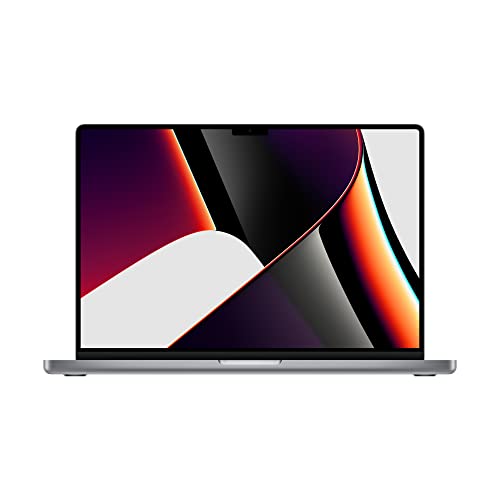

1. Best Overall: Apple Macbook Pro 16”
The Apple MacBook Pro 16” is hands-down the best laptop for writers and bloggers. It’s the device I use, and the one I recommend.
Not only is the device beautifully designed with a bigger screen, but it does a lot of the creative heavy-lifting for you. Unfortunately, you literally pay the price for it. It’s by-far the most expensive laptop on the list.
This is the perfect laptop if you’re blogging, working with video files, creating audio content — and doing pretty much anything you would to run a business online.
Specs:
- CPU: Apple M1
- RAM: 16GB to 64GB
- Size: 16-inch LED backlight display (also comes in 14), 3456 x 2234 native resolution
- Storage: 512GB to 8TB
- Weight: 4.7 lbs
👩💻 Check out this laptop and its price here!
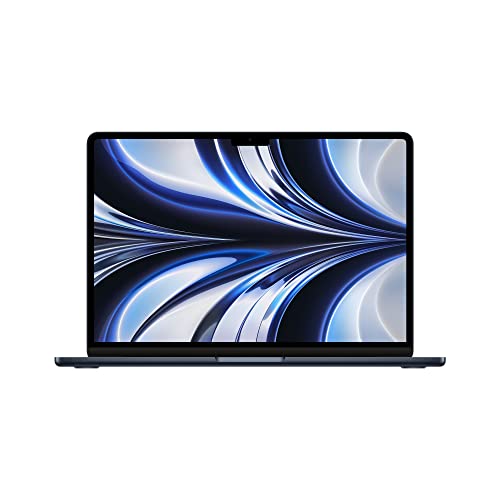

2. Apple Macbook Air
If you love the high quality Apple experience but want something a bit more lightweight and affordable, the MacBook Air is for you.
It’s a thin and powerful laptop with a good battery that’s ready to pack. Wherever your blogging journey takes you, this powerful hardware can make sure that all your blogging needs are met.
From graphic design to website management, this portable laptop is a great choice. But it’s not without its issue – namely, that it could overheat. It’s a quiet device that’s built without a fan, which means it’s prone to overheating.
Overall, it’s an excellent choice that can help you stay on top of the important things.
Specs:
- CPU: Apple M1
- Graphics: Integrated 7-core / 8-core GPU
- RAM: 8GB to 16 GB (M2 Chip = up to 24)
- Size: 13.3-inch LED backlight display, 2560 x 1600
- Storage: 256GB to 2TB
- Weight: 2.8 lbs
👩💻 Check out this laptop and its price here!
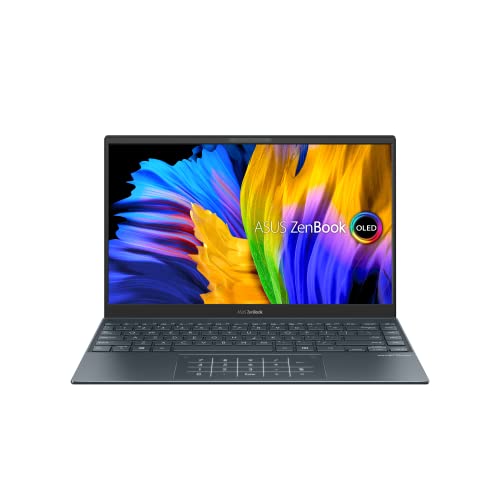

3. Asus Zenbook 13
For something thin and light, the Asus Zenbook 13 is the ideal choice. Weighing in at only 2.5 lbs with 13.3 inches of screen and hours of battery life, it’s the perfect affordable laptop for on the road.
You should have no problem blogging on this device, the 16GB of RAM can handle multi-tasking like a pro. Plus there’s plenty of space for you to store everything you need.
However, if you’re planning on working with video, this might not be the right fit. It comes with only 16 GB of RAM that can’t be upgraded aftermarket.
Specs:
- CPU: AMD Ryzen 7 5800U
- Graphics: AMD Radeon
- RAM: 16GB
- Screen: 13.3-inch
- Storage: 1 TB NVMe
- Weight: 2.5lbs
👩💻 Check out this laptop and its price here!
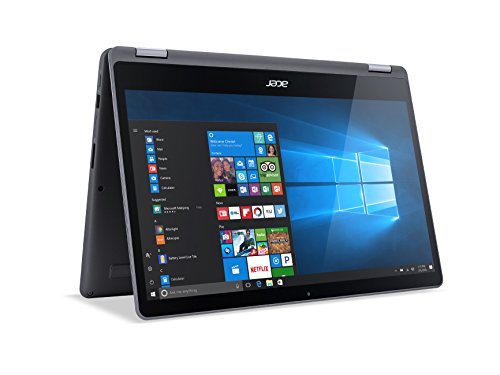

4. Acer Aspire R15
The Acer Aspire R15 is a budget device that’s not extravagant but can get the job done.
With 1TB of storage space, you’ll have trouble maxing this guy out and the backlit keyboard makes it pleasant to work with in low light situations. If you’re just running a basic blog with some social media accounts to market it and have a limited budget, this might be the best choice for you.
While the Aspire R15 is great for simple tasks, the hard drive can be slow for large data transfers and the graphic card isn’t up to par for video editing. It also has a reflective screen, so you’ll want to keep it in doors, and the battery life is limited.
While this device can handle simple blogging, you’ll want to skip it if you’re planning on traveling with your device or working on resource-heavy tasks like media editing.
Specs:
- CPU: Intel core i5-72000U
- Graphics: Intel graphics 620
- RAM: 8GB
- Screen: 15.6-inch
- Storage: 1 TB HHD
- Weight: 5.29 lbs
👩💻 Check out this laptop and its price here!
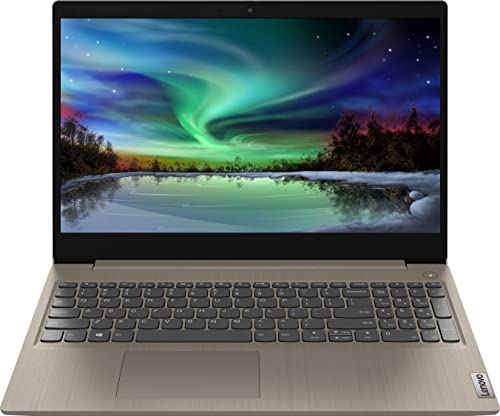

5. Lenovo Ideapad 3
For a high performing budget laptop there’s the Lenovo Ideapad 3. You can often find it for less than $600, making it a great laptop in its price range.
It’s a sturdy device with a comfortable keyboard that also has a fingerprint scanner. You’re able to upgrade the 8GB RAM on your own — but should probably avoid it if you don’t know what you’re doing. It also features a USB-C port and has 512GB of space for you to use.
But while its performance is excellent for its pricing class, the speakers leave you wanting, sound quality is mediocre, and the display dull. All said and done, this is a powerful device for blogging that won’t leave a hole in your wallet.
Specs:
- CPU: AMD Ryzen 5 5625
- Graphics: AMD Radeon Vega 7
- RAM: 8 GB
- Screen: 17.3-inch
- Storage: 512GB
- Weight: 4.84 lbs
👩💻 Check out this laptop and its price here!
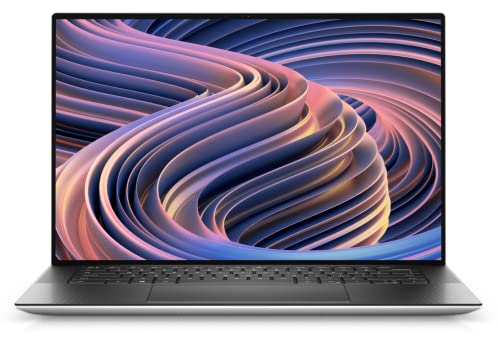

6. Dell XPS 15
The Dell XPS is a great blogging laptop if you want something that’s not Apple.
It features a large screen with a vibrant display that can connect with WiFi 6, and handle high-end software like a pro. You can choose to get it with or without a touchscreen, and provides an overall awesome experience.
Unfortunately, it’s not all amazing. The Dell XPS is higher priced than some of the other PC options, has an average battery life, and data access can be pretty slow. It also has a mediocre webcam, so you might want to consider investing in something a little flashier.
Specs:
- CPU: Intel Core i7-12700H
- Graphics: Nvidia GeForce RTX 3050 Ti
- RAM: 16 GB
- Screen: 15.6-inch, 1920 x 1080 (non-touch) or 3840 x 2160 (touch)
- Storage: 1 TB SSD
- Weight: 4.2 lbs
👩💻 Check out this laptop and its price here!
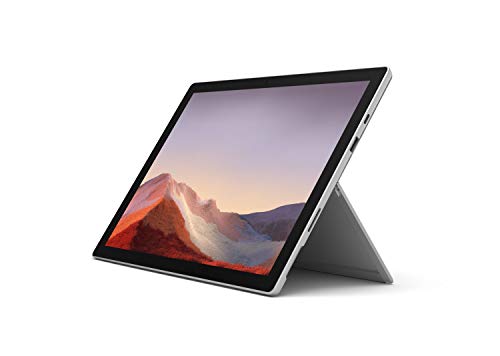

7. Microsoft Surface Pro 7
Technically the Microsoft Surface Pro 7 is a tablet, not an actual laptop. But it’s an affordable blogging device that’s not only portable enough to throw in your bag and take down to the coffee shop, but set up to do everything you need.
Tablets have a sleek, stylish look about them, and the Pro 7 is no exception. The touch screen makes it easy to work but adding the keyboard cover will make it one of the thinnest and lightest writing devices on the market.
This device is particularly convenient for travel bloggers and those always on the go. Packable and sleek, as long as you have your keyboard with you your read to write your next post — whether it’s on the train, in the plane, or at your home office.
While this is a travel-friendly device it is a tablet, and might not work for all activities. It’s also a little on the more pricey side compared to others of similar value. However, that shouldn’t scare you off as overall it has a pretty good reputation.
Specs:
- CPU: 10th-gen Intel Core i3 – i7
- Graphics: Intel UHD Graphics – Intel Iris Plus Graphics
- RAM: 4GB – 16 GB
- Screen: 12.3-inch, 2736 x 1824
- Storage: 128GB – 1TB
- Weight: Less than 2 lbs
👩💻 Check out this laptop and its price here!


8. Acer Swift 3
The Acer Swift 3 is a mid range laptop that’ll cost you less than $1,000, and do pretty much anything you need it to as a blogger.
While the device’s style isn’t anything to write home about, it’s a suitable laptop with a great display. It has thunderbolt support, and features fingerprint security. And, to top it all off, it’s only 2.65 lbs, making it a portable choice.
While it’s packing a lot of performance for an inexpensive device, the webcam inside is mediocre at best. But For less than $1,000, this device is a steal-of-a-deal. However, it’s not the top of the line pick that’ll be needed to do highly graphic work.
Specs:
- CPU: Up to Intel Core i7-8565U
- Graphics: Nvidia GeForce MX159, Intel HD Graphics 620 or AMD Radeon Vega 8
- RAM: 4 GB to 8GB
- Screen: 14-inches, 1920 x 10
- Storage: 128GB to 1TB
- Weight: 2.65 lbs
👩💻 Check out this laptop and its price here!
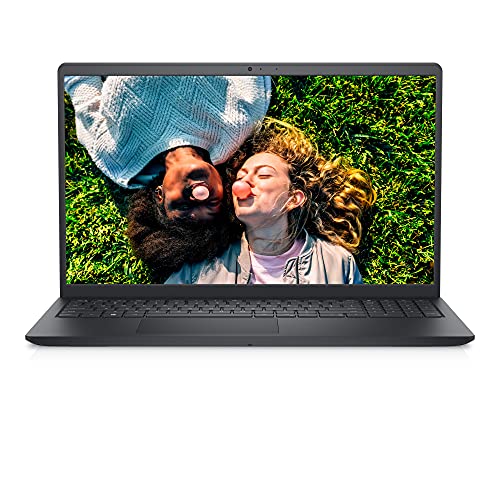

9. Dell Inspiron 15
The Dell Inspiron 15 is a thin, lightweight device that’s easy to carry around and perfect for travel bloggers that are always on the road.
Parts are readily available and the device is easy to access, meaning it’s easy to service and make upgrades. Finally, the touchpad works well and the device feels solid, despite being made of plastic.
Unfortunately, the battery is unlikely to provide you with the whole 8-hour work day. The webcam is also suitable for Zoom meetings but not much more than that, providing an unnatural look with limited sound. Finally the keyboard isn’t the most pleasant choice for everyone.
Specs:
- CPU: Intel Core i5-1235U
- Graphics: Intel Iris Graphics
- RAM: 16 GB
- Screen: 15.6-inches
- Storage: 512GB
- Weight: 4.19 lbs
👩💻 Check out this laptop and its price here!
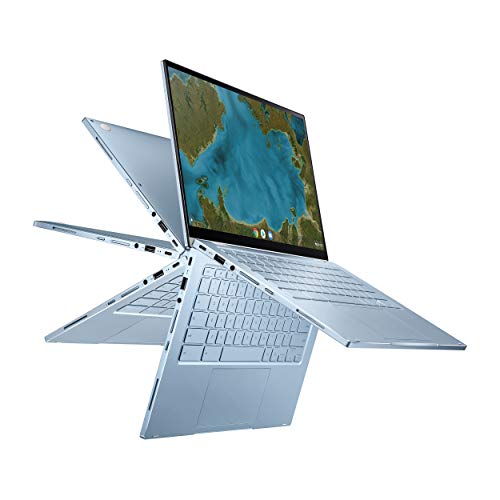

10. Asus Chromebook Flip
The Asus Chromebook Flip is technically a 2-in-1 device, and it functions best in tablet mode.
It’s an inexpensive choice for writers or bloggers who simply need to access the internet and create monetized content. The keyboard is nice to use, and the battery is reliable. Overall, if you want the tablet experience with the option to act as a computer when you need it, this is for you.
The downside is that being built as a budget device means that it doesn’t have a ton of space on the hard drive. That means you need to have constant internet access so you can effectively use cloud storage. It also isn’t known for having the best speakers and the device’s screen size is small.
This is a good device for a small budget and portability.
Specs:
- CPU: Intel Penguin 4405Y – Intel core m3-6Y30
- Graphics: Intel HD Graphics 515
- Screen: 12.5-inch, LED backlit with anti-glare
- Storage: 36GB to 64GB
- Weight: 2.5 lbs
👩💻 Check out this laptop and its price here!


11. HP Spectre x360 13.5
The HP Spectre x360 13.5 is an updated version of the x360 14, their flagship convertible device. It offers both a traditional laptop and a tablet experience all rolled up into one.
This device features an OLED touchscreen and an overall sleek and sturdy design that’ll make any gadget enthusiast proud. It’s performance is great and the battery is long-lasting.
Complaints vary, but overall the device is more expensive than others in its space. It doesn’t provide an HDMI connection (which might not be relevant to you), and the keyboard isn’t the most comfortable.
If you want a sharp-looking, modern device, this is the one for you. It features decent RAM, ample storage, and an overall lightweight, compact design.
Specs:
- CPU: Intel Core i7-1255U
- Graphics: Intel UHD Graphics 620 Integrated
- RAM: 16 GB
- Screen: 13.5, 3000 x 2000
- Storage: 1TB
- Weight: 3.01 lbs
👩💻 Check out this laptop and its price here!


12. Lenovo ThinkPad T480s Ultrabook
The Lenovo ThinkPad T480s Ultrabook has raving reviews for a laptop that you can snag for less than $600.
Its biggest asset is the 6-cell battery with a secondary back-up that gives it a long life. Even when it is out of power, the rapid charge feature makes sure it’s not out for long. There’s a fingerprint reader to beef up security, and backlighting to help low light situations.
Overall, it’s a good device, perfect for running a WordPress blog. However, the design isn’t the most modern choice.
Specs:
- CPU: Intel i5-8250U
- Graphics: Intel UHD Graphics 620
- RAM: 8GB
- Screen: 14-inch, 1920 x 1080
- Storage: 256GB SSD Storage
- Weight: 3.73 lbs
👩💻 Check out this laptop and its price here!
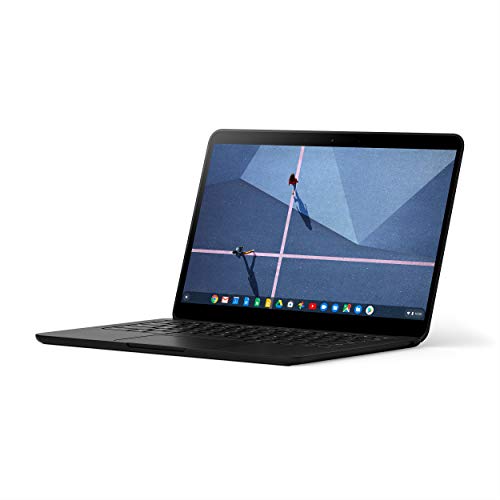

13. Google Pixelbook Go
The Google Pixelbook Go is often described at the best overall of the Chromebooks. That’s also reflected in the price, as it’s priced a little higher too.
This device is designed for light productivity tasks, and its bright screen works well for streaming your favorite show. It works well if your blogging work focuses primarily on the internet. It’s thin and light with a good battery life, and there’s a decent webcam so you can join meetings on Zoom.
But this isn’t the most modern laptop purchase. If you’re going to be adding things like video editing and podcast product to the mix, you’ll want to consider a different device.
Specs:
- CPU: Intel Core m3 – Intel Core i7
- Graphics: Intel UHD Graphics 615
- RAM: 8GB to 16GB
- Size: 13.3-inch, up to 4K LCD display with touchscreen
- Storage: 128GB – 256GB eMMC
- Weight: 2 lbs
👩💻 Check out this laptop and its price here!

How To Choose The Best Laptop For Bloggers?
RAM
Random access memory (RAM) is your laptop’s short-term memory. RAM can be accessed, read and changed in any order, allowing you to swiftly move through programs, copy and paste data, and take other actions necessary to work on a laptop. When choosing a device, RAM is one of the most important factors because, in a lot of cases, it can’t be changed after the fact.
User experience-wise, your device’s short-term memory will translate to speed and capacity. If you’re a perpetual tab opener with a small amount of RAM, you’ll notice your laptop lag or freeze. This usually means that the available short-term memory on your device has reached capacity. For you to access more, you’ll need to close out of tabs, background programs, or even reboot your computer to clear the slate.
Short-term memory — or data stored using RAM — is not accessible once it’s been erased. Once you close a program or restart your computer, the slate is cleaned and that RAM is available for use again. The more RAM a laptop has, the more short-term memory it has and that faster that memory is.
So how much RAM do you actually need to blog?
Surprisingly, not a lot. Any device that has at least 8GB of RAM should work for the average blogger. If you’re podcasting, consider opting for 16GB of RAM. And for video files, 16GB is going to be your minimum.
Storage Space
A laptop’s storage determines how many files it can hold. Different types of files require different amounts of space — a high-resolution image will take up more space than a Word document, and an HD video downloaded from Apple TV will take up more than both (combined).
It’s worth mentioning that there are three different types of storage you’ll come across:
- SSD: Best performance — faster, durable, compact, quieter… but pricier
- eMMC: Mid-range performance — better than HDD but not as good as SSD
- HDD: Worst performance — slower, less durable, noisy, takes up more space… but cheaper
Your average device ranges from 64GB of storage to 2TB+, but more storage equals more money. If your laptop is just being used for blogging, you can get away with a limited amount of storage since most of your files will be stored right in your CMS. But if you’ll be working with video and audio files, or gaming, you’ll need more.
If you’re going to be doing any gaming or designing, the minimum you should be looking at is 512GB. However, you’ll probably have the best experience with 1TB or more.
Battery Life
How much battery life matters depends on how often you plan on being away from a charger. Of course more is better, especially because you can’t upgrade it after the fact. However, most laptops these days have a decent battery life.
On the lower end you might see 2 to 3 hours, likely with smaller, less expensive devices. On the higher end, you’ll see 7 or 8 hours. If you’re a traveler, consider investing in a premium laptop (like the MacBook Pro or Air) which typically have a longer battery life.
My favourite laptop (and the one I use): The Macbook Pro 16″
CPU
The Central Processing Unit (CPU or simply “processor”) gives your device instructions so you can do what you need and want it to do. The more powerful and updated your CPU is, the better performance you can expect.
How much does fast CPU really matter to you?
It depends on what you’re doing with your device. If you’re gaming or editing feature films it really matters. If you’re editing audio or similar, it matters but not quite as much. But if you’re simply blogging the built-in option is perfect.
Portability (Size & Weight)
Laptops that weigh less and are smaller are easier to port around with you. Portability isn’t a big deal for every blogger. But if you’re a travel blogger on your next adventure, the size of your device matters.
Every extra ounce of weight means there’s something else you might have to part with on your trip. If your device is coming along with you, you’ll want to aim for something on the smaller and lighter side.
The lightest weight, best laptop for bloggers is the Macbook Air.
Resolution
The display resolution defines how many pixels can be displayed in each direction (length and width). More pixels means more detail, and more detail typically means you’ll have a nicer overall image.
Displays vary based on individual devices, but some of the most common resolutions you’ll come across, include:
- 720p or HD: 1280 x 720
- Full HD: 1920 x 1080
- 3456 x 2234 (Apple MacBook Pro 16-inch)
It’s worth noting that most devices can support different screen resolutions, with their listed display resolution being their default choice — this means that your screen will look best at that rate.
Price
Price is arguably the most important factor when it comes to picking out your laptop. While it shouldn’t be “all about the money,” you want to make sure you keep your device within reason. The most expensive pick isn’t always the best one — espectiall if you can’t afford it.
Keyboard
Backlighting on your keyboard is more important than you’d expect it to be, especially if you’re someone who excels at working in the evening. You also have different options for keyboard language if you get your device in the right place, make sure you’re working in whatever one works best for you.
Microphone
If you’re recording a podcast or shooting a YouTube video, you should be using a quality external microphone. However, if you’re just taking a quick call, you can get by with the built-in microphone.
Ease of Finding Parts
Factoring in how easy it is to find parts really only matters for some deceives. If you’re opting for something like the Apple MacBook Pro, you won’t be a be able to change out parts. And honestly, if you’ve never fixed a computer and you don’t know what you’re doing, have it done professionally.
That said, some PC devices do allow you to change out parts and update things like the RAM. But Make sure that you are SURE your comfortable with this before you make that a deciding factor.
My favourite laptop (and the one I use): The Macbook Pro 16″
Best Laptops for Bloggings FAQs
Can I use a Chromebook for blogging?
You can use a Chromebook for blogging, but its capabilities will likely fall short if you try working with video or audio files too.
What kind of laptop is best for blogging?
We recommend the Apple MacBook Pro since it can do anything you’ll need it to. However, if you already have a laptop, chances are it’s perfectly suitable to start blogging with!
👩💻 My favourite laptop (and the one I use): The Macbook Pro 16″
Do I need a laptop to start a blog?
Yes, getting a blog off the ground requires a laptop or a desktop.
Can I use my phone to start blogging?
Starting a blog from scratch with your phone is challenging. But once you’re up-and-running it could be feasible to maintain it with one. I recommend going with a laptop as we find it provides more working options, and it’s easier to work with.
Can you blog on any laptop?
You should be able to blog on any laptop, so long as you’re able to access the internet.
How expensive is a blogging laptop?
You can find decent blogging laptops for less than $600.
How much RAM do I need for blogging?
You’ll want at least 8 GB of RAM to blog with. However, if you’re working with audio or video files, 16GB+ is what you should be aiming for.
Which laptop is best for WordPress?
Most laptops will work for WordPress, as long as they can connect to the internet and have enough RAM (8GB+ is best). I recommend a Macbook Pro, but you can get away with something less expensive.
👩💻 My favourite laptop (and the one I use): The Macbook Pro 16″
Best Laptop for Bloggers: Which is the Best?
Your budget should play the determining role in deciding what the best laptop for you is because you can’t spend money you don’t have.
However, we recommend the MacBook Pro 16 as the best blogging laptop.
This device can handle anything you throw at it from working on WordPress to editing YouTube videos. Its overall design is elegant and its performance is perfect for your content creation business.
This device is on the heavier side of all the devices on our list. If you’re planning on traveling but still want that same experience, the MacBook Air is probably the best laptop for travel blogging – especially if you need to pack it up and go often.
If you have a smaller budget, there are plenty of devices that will work great for managing your blog. Ultimately, you’re looking for a single device that can do all you need it to. That’ll be the perfect blogging laptop for you.
👩💻 My favourite laptop (and the one I use): The Macbook Pro 16″
Read More of My Best SEO Tips:
- Free SEO Content Writing Checklist for Bloggers: 25 Essentials to Include
- 28 Best AI Copywriting Tools in(SEO + Blogger Tested!)
- 1:1 SEO Coach Services with an SEO Specialist and 6-Figure Blogger
- Services
- Shop All of She Knows SEO
- How Many Blog Posts Before Traffic From an SEO Strategy?
- What are Snippets? (SEO Guide + Definition)
- What is the Ideal Blog Post Title Length for SEO?
- 55+ Blogging FAQ Answered: Everything You’ve Wanted to Know About Blogging Professionally
- URL Structure Best Practices: Why You Should Use SEO-Friendly URLs
- How Many Keywords Should I Use for SEO?
- Are SEO Keywords Case Sensitive?
- Is Google Analytics Free?
- 13 Best Laptops for Blogging (Guide from a Blogger)
- Essential WordPress SEO Plugins for Bloggers
- Are Blogging Courses Worth It?: Should You Spend the Money
- 37 Advantages and Disadvantages of Blogging
- Basic SEO for Travel Bloggers: 19 SEO Tips to Scale to Full-Time Income
- SEO Outreach: What It Is and Why It’s Vital for Bloggers
- Blogger Personality Quiz: What Type of Blogger Are You?
- Accepting Guest Posts on Your Blog: The Ultimate Guide 2023
- What’s Your SEO Animal Mascot?
- Vlog vs Blog: Which Online Business Should You Pursue?
- Google E-E-A-T for SEO: Ultimate Guide for Bloggers
- Do You Need Videos for E-E-A-T? From an SEO Expert
- Google Reviews Update April 2023: Not Just for Products
- Should You Be Worried About the March 2024 Google Core and Spam Updates?
- 5 Quick SEO Wins You Can Do Today
- How to Write Alt Text for SEO and Accessibility Wins
- How to Export Data From Google Universal Analytics Before July 1, 2024
- When to Change a Blog Post URL: 7 Common Scenarios
- This is The Biggest Google Search Algorithm Leak in History. Here’s What it Means for Bloggers
- Did Google’s 2024 March Core Update Kill Blogging?
