
She Knows SEO contains affiliate links and is a member of the Amazon Services LLC Associates Program. If you make a purchase using one of these Amazon links, we may receive compensation at no extra cost to you. See our Disclosure Policy for more information.
How Long Should a Blog Post Be for SEO in 2024?

One of the questions I get asked by my clients is “how long should a blog post be for SEO?”
The short answer: it depends!
There are so many factors that you need to assess for each blog post before you determine what the ideal length is.
To help you understand why blog post length matters, let’s consider Google for a moment.
Google wants to rank websites in their search engine, and they are more likely to rank a website that has great content. Great content means it answers the user’s search intent so they are getting the information they need.
The length for SEO will depend on the search query from a user.
A good rule of thumb is AT LEAST 600 words.
Google doesn’t give much credit to anyone that has a post less than 600 words. That’s the minimum length they expect for you to be sharing helpful information.
But finding out how long your blog post should be for SEO will take some more work. I’m here to help you figure it out!

Profitable Part-Time Blogger
Ready to grow a blogging business that fits your life?
The Profitable Part-Time Blogger Program helps you attract your ideal audience, master SEO, and make $5K/month—all in just 20 hours a week.
Whether it’s a side hustle or your dream job, it’s time to work smarter, not harder. Let’s make your blog work for you!

What is the Ideal Length for a Blog Post?
The answer is not as straightforward as you might think.
A better question might be: how long is too short or too long?
If your blog post is too short, it may not answer all of your user’s questions. If it’s too long, it may bore them.
Let’s go through this with an example:
Someone who is searching for “what is the population of Canada” wants to know the basic number of the population.
They may want a bit more information, but they’re likely just looking for a quick answer to their question.
They definitely don’t want 4,000 words about Canada’s climate, currency, best TV programs, and weirdest moose attack stories.
However, if they search “how has the population of Canada grown since its beginning”, they want a much longer article.
This will need to exceed 1,000 words to include all of the facts that the user is hoping to get from this article.
How to Determine the Length of Your Blog
There are some things to consider before deciding what the ideal length for your blog post is.
1. What is your user’s search intent?
Does your user need a complex answer or a quick tidbit?
You can determine this by searching your query in Google and seeing the types of answers that come up.
Google is already giving us a roadmap to follow with what they’ve decided is “best” so far. Whether or not you agree with it, if you want to rank #1 you need to keep this in mind.
You can also see their related questions.
These are great to include to lengthen your post and to ensure your user doesn’t need to go elsewhere to find more information after they’re done reading your post.
2. How Long Are Competitors’ Blog Posts?
Google is ranking you against other bloggers. That means you need to outperform them.
Look at the top 10 or 20 results for your query. How long are their posts?
If you see that all of the posts are about 1,000 words, then you’re safe to write a shorter article.
However, if they’re all over 5,000 words, you’ll need to hunker down and write a long piece of content to have a hope to rank for SEO.
Now, longer doesn’t always mean better. But typically it does provide more comprehensive results.
A 500 word post on “best things to do in Canada” will be far less thorough than a 5,000 word post for the same keyword.
At the same time, we don’t want to bore our readers. How many times have you heard people complaining about how far they need to scroll to get to a recipe on a website?
3. Consider What You Have to Offer For Your Blog Post Content
Typically, SEO strategists recommend writing more than your competitors. The assumption is that the longer your post is, the more information you’re including, so the better you’re serving your users.
However, I have seen so many people write 10,000 word blog posts to outrank others that are just wasted words. They repeat themselves, don’t answer user search intents or additional questions, or fill space with random affiliates.
The point is not to write long content for the sake of long content. You should be writing long content to help your readers.
To be competitive, try to write about the same length as the top 10 posts in Google. But don’t strive to double the word count thinking it’ll help you beat them if you’re not including helpful information.
(The same goes for posts. More posts on your site doesn’t magically mean you worked harder than your competitors, you’re more helpful, or you “deserve” more traffic.)
4. Does Your Reader Need This Information?
Long blog posts can be a quick death for bloggers.
Not only do they take forever to write, but they can also deter readers.
Before you decide to write 10,000 word blog posts, consider whether or not it’s appropriate for the search.
I wrote a New Zealand bucket list post that was over 12,000 words because it included every single amazing activity a person would want to do on their New Zealand trip.
I would never have written a 12,000 word post about the ideal length for a blog post – because who is going to read all of that??
Y’all would be out of here the moment you started scrolling – especially if I didn’t provide the info you needed right away (notice how I did it in the intro?).
Quick Steps to Determine How Long Your Blog Post Should Be
- Find your ideal keyword. I recommend finding 3-5, including secondary keywords.
- Determine the user’s search intent. What are they wanting to know?
- Analyze your competitors. How long are their blog posts? What do they include? What information are they missing?
- Check the “also asked” and “related queries” sections of Google and the related keywords to see what else you can add in
- Try to out perform the other ranking blog posts by writing content of a similar length, that answers your user’s intent, and that further fulfills their needs so they don’t need to go anywhere else for information
Pro tip: Keysearch has a feature to help you determine the average length of blog posts in SERP results for a keyword. Get 30% off with code “SHEKNOWSSEO”
Long Vs. Short Blog Posts
Many people who ask about how long a blog post should be for SEO assume that long content is king.
But some bloggers succeed with only writing 600 word posts (or even shorter!).
There’s nothing to say that one is right and the other is wrong, as long as you are putting your reader first.
You also don’t have to commit to a certain blog length from the get-go. Not all of your blogs need to be the same length.
My ideal length for a blog post I’m reading changes based on my keyword.
If I was searching for the best type of garlic press, I’d want a long article comparing a few types of garlic presses. However, if I just want a quick answer, like is mincing garlic the same as using a garlic press, I’d be satisfied with a much shorter post.
Those two people are searching similar things, but their intent is wildly different. So I also know I need to separate those keywords into two posts.
I advise my clients to think about how much they’d want to read on this topic before they start writing.
Remember, if you’re writing longer content, you’ll need to break it up to optimize for SEO!
Optimizing Blog Length for SEO
With SEO, it’s also important to compare your content to others ranking for your keywords. The more you can do in a post, the better!
A topic’s ideal length in words depends on how much expertise it takes to explain that concept. If I’m writing about how to make French toast, I want to include as many recipes and cooking methods as possible.
It would be helpful for me to add how much time it takes and how to serve it.
If I wrote about how to use a French press, then something short and sweet would be sufficient.
It’s important that you do your own keyword research before writing any blog post. You can use Keysearch for this.
This is my favourite SEO tool. I’ve used paid and free tools before, but nothing gives me the data that Keysearch does for such an affordable price.
You can do a SERP analysis of the top 10 posts ranking for your keywords and open them up to check their length. It’ll also help you learn what information is already being provided to your readers so you can figure out what you need to include.
Check for what these competitors aren’t sharing yet. Is there a gap that you can fill?
Maybe the other French toast recipes don’t talk about non-dairy milk alternatives. Or maybe they only consider basic white bread.
Use these gaps to make your content even richer for your audience!
How to Check the Length of Competitors’ Blog Posts
To check your competitors’ length, open up their blog post and use the free Google Chrome plugin Word Counter Plus. All you need to do is select all of the text, right-click, and click on Word Counter Plus. Then you’ll know how long the whole post is.
Tip: Exclude any comments at the bottom of a post. This can make it seem way longer if the blog owner hasn’t nested the comments on different pages.

You can also do this with the free Ahrefs chrome extension.
Blog Post Length Statistics
Oberlo found that in 2021, the average blog post length was 1,500-2,000 words.
Blog post lengths are on the rise. This average is a huge jump from the 880 average word count seven years ago.
Similarly, OrbitMedia found that more long form articles are being written than ever before!

Hubspot found that 2,100-2,400 words are the ideal length for blog posts to rank for SEO. They did an analysis of their own content to determine this.
However, the posts that generated the most leads (not traffic!) were even longer, averaging 2,500 words.
Hubspot conducted a study to determine the ideal blog post length for SEO for different types of blogs. They found that these were the best word counts for different blog types:
- Pillar Pages = 4,000 words
- Listicles = 2,300 – 2,600 words
- How-to Posts = 1,700 – 2,100 words
- What Is Posts = 1,300 – 1,700 words
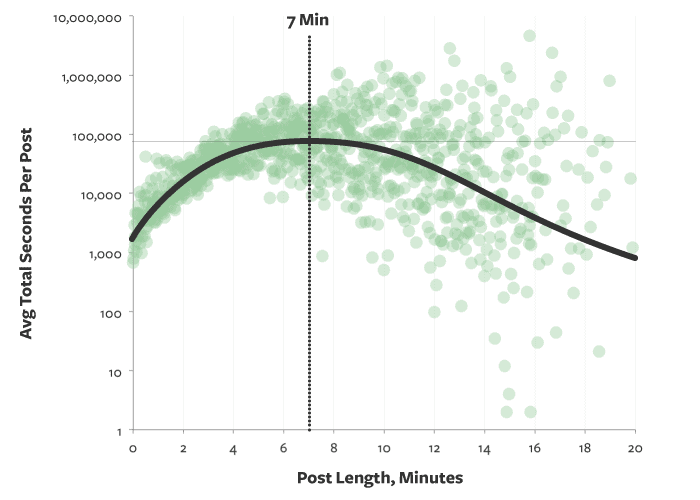
Medium‘s Mike Sail conducted a study to see how long audiences read blog posts. According to them, readers spend 7 minutes on posts. This correlates to a length of 1,600 words.
Ryan Robison found that the blog posts that the top-ranking posts on Google average between 1,140 – 1,285 words.
This could be a result of high DA sites that write small content pieces. Bloggers typically need more than this to rank.
SemRush has noted that bloggers are spending more time than ever on posts. In 2014, bloggers spent 2 hours before hitting publish. In 2020, we’re working on our posts for 6 hours before publishing!
On average, long-form content generates eight times more page views, three times more social media shares, and nine times more leads than short-form content.
SemRush
Semrush also found that bloggers who earn $50k a year say their most popular posts are about 2,400 words long.
To improve your SEO, you need backlinks. Semrush found that content of 3,000 words or more is more 3.5x more likely to receive backlinks.
How to Break Up a Long Blog
Headings
There are a few different ways to break up a long blog post for UX, but one way that I find works the best is by using subheadings.
This will make the blog post more organized and easier to read.
When doing this, it’s important to make sure that each heading has its own point and avoids coming back to an idea two or more times.
I used a variety of H2, H3, and H4 headings in this post. If you had wanted to skim, you could get the basic information by reading these headings before you dove into the paragraphs.
This allows users to get an idea of what they’ll learn so they can decide if your blog post will answer their questions.
Media
When splitting up your long posts you can also add in images and videos for points of interest in the post.
These visuals will help break up the text and keep readers engaged in your content.
With so many readers skimming posts, having visuals that can draw the eye and perhaps help illustrate your point will keep them engaged.
It’s also super helpful for different styles of learning. Remember: not everyone learns best by reading. Visual learners may learn better with images, video tutorials, or other media examples.
Certain blogs lend themselves really well to media. Travel, beauty, and food niches can always use media in tandem with their headers to help break up long content and keep their readers engaged.
Don’t just add in media for the hell of it! It can slow your site speed, confuse readers, and actually put them off reading your post.
White Space
You can see there’s a lot of white space between my H2 headings on this post.
That’s because it helps the eye visually see the topic breaks between the sections.
Short Paragraphs
We live in an age of skim readers.
This sucks for bloggers who put hours into each post, but you’ve got to accept it.
One way to help readers skim is to give them shorter paragraphs so they can find their way through the content easily.
Bold and Italics
Use bold and italics in the text to highlight important information.
Don’t overdo it!
You just want to give people the top tips they should be taking away from your post. Not every paragraph will need to have some style added to it!
How to Increase Your Blog Post Length
So many of my clients are aiming for an ideal blog post length that will help for SEO, but they have no idea how to write more than 600 words.
Let’s be real, there’s only so much you can think to say on French toast of the top of your head, right?
To help you increase the length of your blog post so you can compete to rank on Google’s first page, follow these tips:
- Check the “People also ask” section of Google. Use these questions as headers, FAQs, or as larger sections of your content.
- Check the “Related search terms” section of Google. Use these as headers or FAQs.
- See what questions aren’t being answered by your competitors. When you read their posts, is there anything you wish they’d included? Check their comments to see if there are questions people are asking that aren’t answered above.
- Go on Quora to see what people are asking about your topic. Add these questions in to your post so you can answer them for your audience.
- Use examples throughout your post to illustrate what you’re saying.
- Use a header for each part of the topic. If you are writing a recipe post, you’ll have a heard for either each ingredient or each step. This will help you elaborate on the sections.
- See if there is a relevant affiliate you can mention in a section of the post.
5 Tips to Write a Blog Post that Ranks for SEO
- Choose a keyword you can realistically rank for. I recommend finding longtail keywords (keywords with 3+ words). Try to find 3-5 for each post.
- Analyze your competitors. What informaton do they provide that you could, too? What information are they missing? What media do they use? How easy is it to read their post?
- Optimize your blog post for SEO. Ensure you are using a proper URL structure, they you use the keyword throughout the post, and that you are answering the user’s question (and any others they may have).
- Write a summary at the end of your post to make it easy for audiences to digest the information they learned.
- Use RankMath to set up your off-page SEO. Ensure you have internal and external links. Create a meta description for Google.
Profitable Part-Time Blogger
Ready to grow a blogging business that fits your life?
The Profitable Part-Time Blogger Program helps you attract your ideal audience, master SEO, and make $5K/month—all in just 20 hours a week.
Whether it’s a side hustle or your dream job, it’s time to work smarter, not harder. Let’s make your blog work for you!
Wrap Up
If you want to rank well in search engines, blog posts should be at least 600 words.
However, the real ideal blog post length is dependent on how much expertise it takes to explain a concept and how many keywords the content covers.
For my travel blog, I typically write 2,000 words minimum for SEO traffic. However, my food blog is usually 1,000 words for posts – including the recipe.
On this site, I have posts ranging from 700 words to 15,000 words! It all just depends on the specific keyword.
Jasper AI can help you write better quality articles faster by automating the process!
Keep in mind that if your blog doesn’t have any keyword optimization techniques or SEO-friendly formatting, then adding more words may not yield any additional benefits when it comes to ranking higher in search results pages like Google’s SERPs.
Read More of My Best SEO Tips:
- Free SEO Content Writing Checklist for Bloggers: 25 Essentials to Include
- 28 Best AI Copywriting Tools in(SEO + Blogger Tested!)
- 1:1 SEO Coach Services with an SEO Specialist and 6-Figure Blogger
- Services
- Shop All of She Knows SEO
- How Many Blog Posts Before Traffic From an SEO Strategy?
- What are Snippets? (SEO Guide + Definition)
- What is the Ideal Blog Post Title Length for SEO?
- 55+ Blogging FAQ Answered: Everything You’ve Wanted to Know About Blogging Professionally
- URL Structure Best Practices: Why You Should Use SEO-Friendly URLs
- How Many Keywords Should I Use for SEO?
- Are SEO Keywords Case Sensitive?
- Is Google Analytics Free?
- 13 Best Laptops for Blogging (Guide from a Blogger)
- Essential WordPress SEO Plugins for Bloggers
- Are Blogging Courses Worth It?: Should You Spend the Money
- 37 Advantages and Disadvantages of Blogging
- Basic SEO for Travel Bloggers: 19 SEO Tips to Scale to Full-Time Income
- SEO Outreach: What It Is and Why It’s Vital for Bloggers
- Blogger Personality Quiz: What Type of Blogger Are You?
- Accepting Guest Posts on Your Blog: The Ultimate Guide 2023
- What’s Your SEO Animal Mascot?
- Vlog vs Blog: Which Online Business Should You Pursue?
- Google E-E-A-T for SEO: Ultimate Guide for Bloggers
- Do You Need Videos for E-E-A-T? From an SEO Expert
- Google Reviews Update April 2023: Not Just for Products
- Should You Be Worried About the March 2024 Google Core and Spam Updates?
- 5 Quick SEO Wins You Can Do Today
- How to Write Alt Text for SEO and Accessibility Wins
- How to Export Data From Google Universal Analytics Before July 1, 2024
- When to Change a Blog Post URL: 7 Common Scenarios
- This is The Biggest Google Search Algorithm Leak in History. Here’s What it Means for Bloggers
- Did Google’s 2024 March Core Update Kill Blogging?
Read More of My Best SEO Tips:
- Free SEO Content Writing Checklist for Bloggers: 25 Essentials to Include
- 28 Best AI Copywriting Tools in(SEO + Blogger Tested!)
- 1:1 SEO Coach Services with an SEO Specialist and 6-Figure Blogger
- Services
- Shop All of She Knows SEO
- How Many Blog Posts Before Traffic From an SEO Strategy?
- What are Snippets? (SEO Guide + Definition)
- What is the Ideal Blog Post Title Length for SEO?
- 55+ Blogging FAQ Answered: Everything You’ve Wanted to Know About Blogging Professionally
- URL Structure Best Practices: Why You Should Use SEO-Friendly URLs
- How Many Keywords Should I Use for SEO?
- Are SEO Keywords Case Sensitive?
- Is Google Analytics Free?
- 13 Best Laptops for Blogging (Guide from a Blogger)
- Essential WordPress SEO Plugins for Bloggers
- Are Blogging Courses Worth It?: Should You Spend the Money
- 37 Advantages and Disadvantages of Blogging
- Basic SEO for Travel Bloggers: 19 SEO Tips to Scale to Full-Time Income
- SEO Outreach: What It Is and Why It’s Vital for Bloggers
- Blogger Personality Quiz: What Type of Blogger Are You?
- Accepting Guest Posts on Your Blog: The Ultimate Guide 2023
- What’s Your SEO Animal Mascot?
- Vlog vs Blog: Which Online Business Should You Pursue?
- Google E-E-A-T for SEO: Ultimate Guide for Bloggers
- Do You Need Videos for E-E-A-T? From an SEO Expert
- Google Reviews Update April 2023: Not Just for Products
- Should You Be Worried About the March 2024 Google Core and Spam Updates?
- 5 Quick SEO Wins You Can Do Today
- How to Write Alt Text for SEO and Accessibility Wins
- How to Export Data From Google Universal Analytics Before July 1, 2024
- When to Change a Blog Post URL: 7 Common Scenarios
- This is The Biggest Google Search Algorithm Leak in History. Here’s What it Means for Bloggers
- Did Google’s 2024 March Core Update Kill Blogging?
