
She Knows SEO contains affiliate links and is a member of the Amazon Services LLC Associates Program. If you make a purchase using one of these Amazon links, we may receive compensation at no extra cost to you. See our Disclosure Policy for more information.
Link Whisper Review: SEO Expert’s Take on the Internal Linking Tool (2024)

You may have come to this blog post knowing what Link Whisper is or maybe you know of it but aren’t sure if it’s worth your time.
While I’m an SEO specialist. I’ve been using Link Whisper for over 8 months and I’m going to break down this tool for you.
If you don’t know, the Link Whisper plugin is a tool that helps you manage your internal linking.
It does this by helping you find relevant pages to link to and then adding those links to your page automatically.
This can help improve your SEO, as well as the user experience on your site.
I LOVE Link Whisper.
As a blogger with over 200 posts on my main site, I don’t have the time or the memory to manage internal linking every single post – especially new posts – across my site while maintaining my intentional internal linking strategy.
Using an internal linking plugin is an easier way for website owners to improve their authority with search engines.
Let me break down why I love Link Whisper and how it’s helped save me time, money, and Google rankings!
🤩 Get the #1 internal linking plugin (and my favourite plugin!) today!
What is Internal Linking?
Internal linking is the process of adding links from one page on your website to another.
Essentially, it’s what inspired the previous name of the Profitable Part-Time Blogger – my signature SEO course/program.
You’re sending Google on a road trip through your site.
Starting from your homepage, you can send Google to a topic (i.e. Canada), then send it to a post (i.e. Things to Do in Toronto). From there, you’d internal link to other posts on Toronto or Canada to show Google that you know what you’re talking about.
This gives Google a road map with points of interest being your blog posts.
I map out an intentional internal linking strategy in my Dominate Your DA ebook (because it’s a big part of building your authority that most bloggers don’t take advantage of!).
Does Internal Linking Help Google Rankings?
YES. Linking internally helps Google understand your site better and can help improve your search engine rankings.
It’s one of the many on-page SEO factors that I take into account when optimizing a post or page.
Linking to other posts on your site tells Google that you’re an expert on the topic.
It’s like citing a source in an essay – but you’re the source.
🤩 I recommend this plugin for internal linking

What is Link Whisper?
Link Whisper is a WordPress Plugin that helps you manage your internal linking. It was created by Spencer Haws of Niche Site Pursuits.
It does this by helping you find relevant pages to link to and then adding those links to your page automatically.
It’s artificial intelligence uses natural language processing to find anchor text that will improve your posts’ SEO strategy.
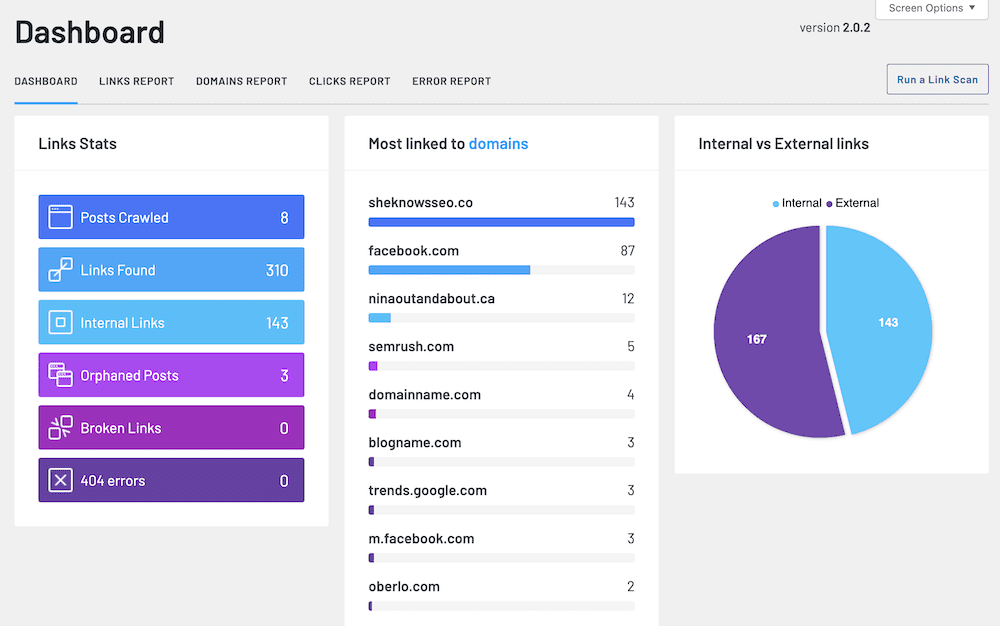
How Does Link Whisper Work?
Link Whisper scans your site to find all internal and external links.
Then it connects with your SEO plugin (i.e. Rank Math/Yoast), Google Search Console, and any custom keywords you add to their system. This pulls relevant keywords for each post that you’re targetting to suggest relevant links.
The artificial intelligence of the plug in will run this data through every other post that exists on your site (it can also search images, Google Web Stories, and pages depending on your settings), to find relevant link opportunities.
You can then view these opportunities in the Link Whisper interface and choose which links to add.
Link Whisper will then automatically add those links to your post for you.
You can also use Link Whisper to manage no follow/do follow settings, open in new tab for internal/external links, and more.
These are clean code links, so there’s no heavy HTML added, just a simple “<a href…” code like any other link.
With Link Whisper, you don’t have to spend hours or days combing through your site manually, and potentially missing valuable opportunities for links.
🤩 Start internal linking with Link Whisper today!
Link Whisper Review
I started using Link Whisper after the founder of Stupid Simple SEO mentioned it in his email newsletter.
At the time, I was still new to internal linking. In fact, I’d been putting it off because he specifically taught a very slow manual process to go through Google to add these links.
I kept thinking to myself, “I barely have the time to write new posts. When am I going to have the time to spend days just adding links??”
The answer: I didn’t.
So I put it off for MONTHS.
Then I found a deal for Link Whisper on App Sumo (it has now expired). So I figured I’d give it a shot.
It was love at first sight.
To be honest, I misused the tool at first, just adding in links willy-nilly for the first few posts.
I had to stop myself and think about adding in links intentionally. So not just linking to any old Canada post when I saw the word “Canada”.
Instead, I had to think about the context of sentences and the relevance to the overall post.
Link Whisper won’t teach you that strategy, but it can make it 200x easier to implement.
With Link Whisper, I was able to go through all 210 posts on Nina Out and About to add intentional and relevant internal links from across my site.
And guess what?
My posts started to rank better!
Posts I hadn’t touched in a year started climbing 5+ spots higher even on page 1 of Google!
Most people think backlinks are where the power comes from, but I’m all about the hidden power of internal linking.
And with Link Whisper, you don’t have to fear the time it’ll take to implement a strong internal linking strategy.
I’ve since upgraded to have Link Whisper on all of my sites, even the ones with only 10 posts or so. Because I know the power of the tool and that it will serve me in the long wrong.
Get Link Whisper, my favourite internal linking plug in, to improve your SEO!
How To Use the Internal Linking Tool
Downloading the WordPress Plugin
There is a free Link Whisper plugin that you can find in the plugin library from WordPress.
This is not the plugin you need.
To get your paid plugin, you’ll need to visit the Link Whisper site.

Click “My Account” on the menu bar (you may be prompted to log in).
On this page, you’ll see “My Downloads”.
Click the linked file beside your applicable download.

This will automatically download a ZIP file to your computer.
Upload this (do not unzip it!) to your WordPress plugin page.
You will need to then validate the license.
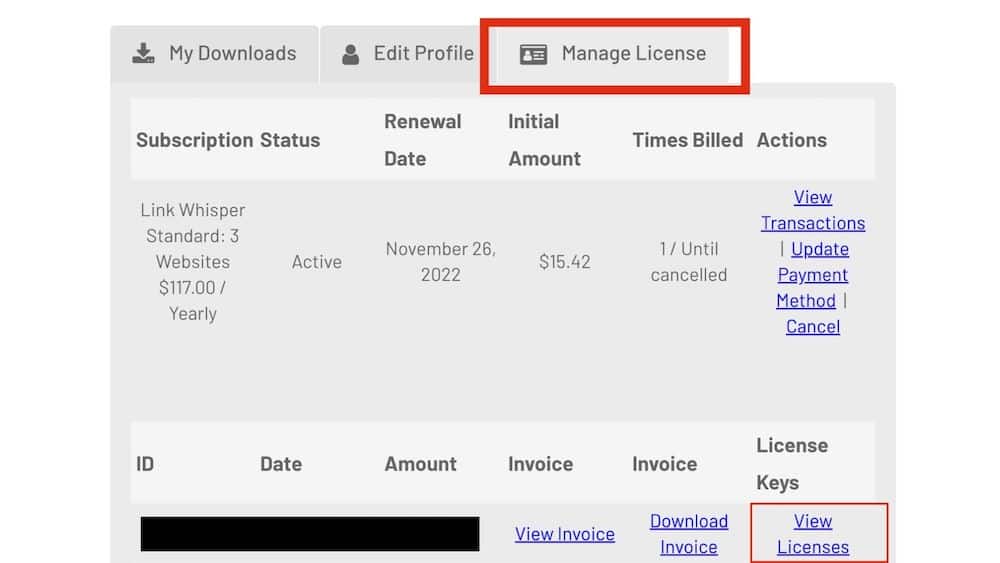
Back in your account on Link Whisper. Click “Manage License”.
First, it will show you your subscription type. Below that will have your license keys.
Click “View Licenses”. Then on the new page click “Manage Sites”.
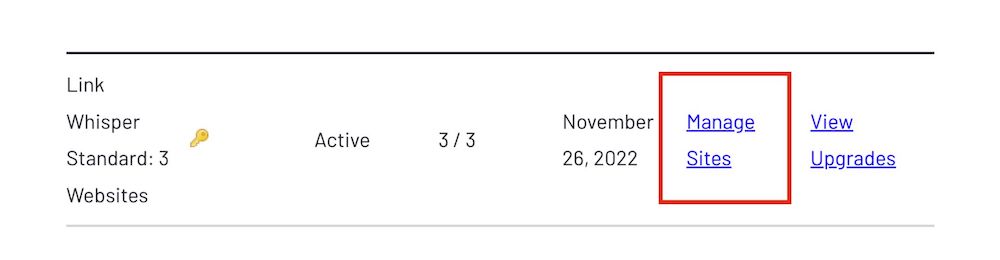
You will be taken to a page with your license key.
You can then copy this license to your valid number of sites.
If your license is only for one site, it will only work on one site. Even if you upload the plug in to others, it will not function.
Inbound Internal Links
To add internal links pointing to a post, do the following:

Go to the Link Whisper plugin on your sidebar in WordPress and click “add inbound internal links”.
You will need to run a new link scan if you have added any new posts in the last hour.
Find the post you want and click on the “Add” link in the Inbound Internal Links column.
This adds a link to a post from any other post on your site.
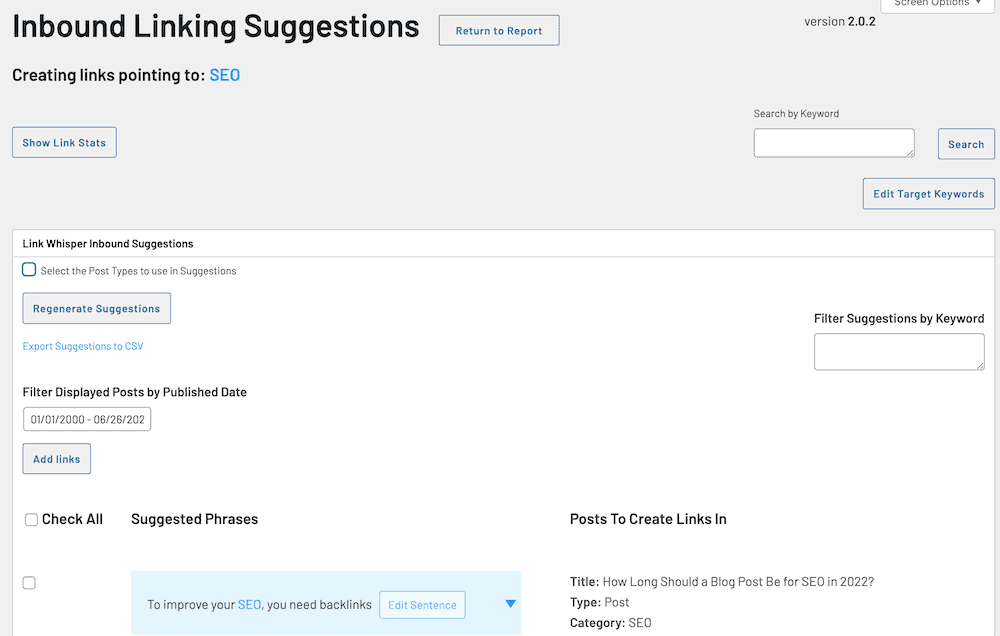
It pulls relevant anchor text from your post title, Rank Math set keywords and GSC keywords you’re ranking for. You can toggle them on or off.
You can also filter by specific keywords or search your site for specific keywords.
I toggle my inbound links by category to ensure that I am not linking across my site randomly.
Select the links you want to be added.
You can change the anchor text by clicking on different words in the suggested results. You can even edit the sentence to better fit anchor text for your internal link.
If there is a blue box, you can select from multiple spots in the post to add your link.
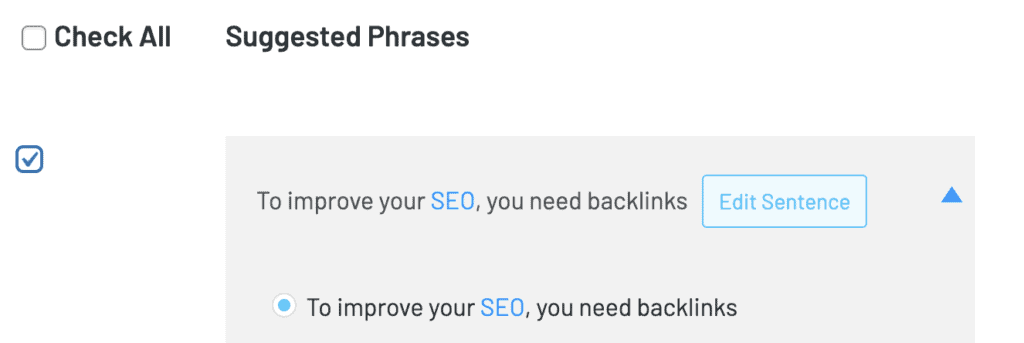
Ensure you click the check box on the side or your link won’t be added when you click the “add links” button at the end of the post.

Then your links will automatically be added.
Outbound Internal Links
Outbound internal links are from a post you are writing to other posts on your site.
This is helpful so you don’t have to go and re-do your inbound internal linking because new posts haven’t been analyzed.
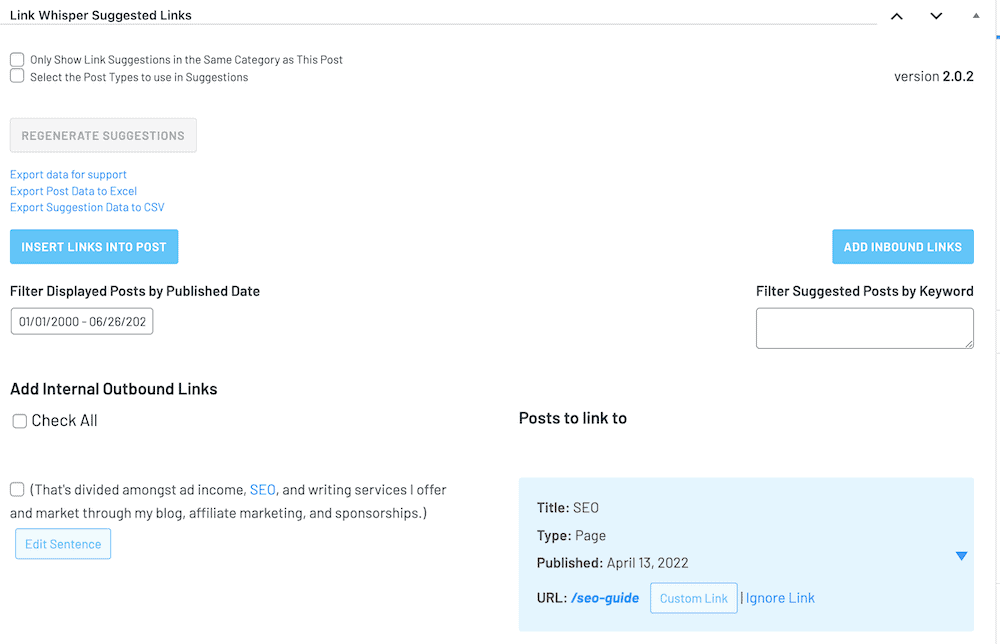
To add outbound internal links, once you have a post ready to go, ensure it’s been saved in draft. If you wrote the post in one go, you may need to refresh the page to show these suggestions.
In the edit page of a post or page, scroll to the bottom past the text.
Much like the inbound links, it will pull keywords from Rank Math, GSC, post titles, and any custom ones you added to those pages’ inbound pages.
The Link Whisper artificial intelligence will run through your new post to find opportunities to link to other posts on your site.
You can select different anchor text, edit the sentence to better fit context, and even get suggestions for multiple links for each opportunity.

When you’re done, scroll to the bottom and select “Insert Links Into Post”.
This will refresh your page, which is why it’s important to have it saved in draft before you begin this process.
Outbound External Links
Although you can’t add external links with LinkWhisper, you can monitor them and set them to no-follow, sponsored, and open in a new tab.
I love the feature to set any external link to open in a new tab, so I don’t have to manually select it every time.
Link Whisper Reports

Internal Link Reports
The internal links report page shows you every post and page on your site, along with how many internal links they have coming into the post, how many they have going out of the post to others on your site, and how many external links are in the post.
You can filter this view by category, most or fewest links, and even by post type.
You can download this file to Excel as well, so you can keep track or share it with your team.
Domain Reports
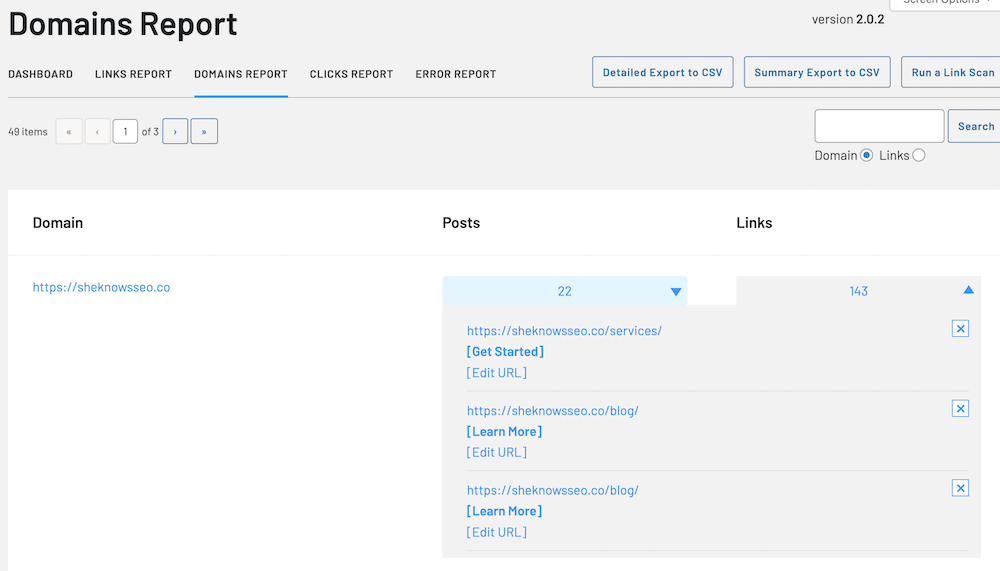
The domain reports show how many times you link to other domains on your site – including your own.
It shows you all of the times that you link to a domain, like Google.com.
You can click “edit” on any of these links to make changes.
I love this function for finding out of date affiliate links and amending them easily, or for updating links that I didn’t use to be an affiliate for a product and now I am.

Clicks Reports
This doesn’t register every click from GSC or anywhere off your site.
It monitors clicks via links on your site itself.
So you can check if an internal link is performing well based on whether or not people are clicking on it.
The same goes for external or affiliate links. This allows you to track whether they are in the best location or not.
Error Reports
The error report page is home to broken links.
Honestly, this is the only area of Link Whisper that I feel needs some work.
Because it’s running inside your site, it often misses redirects or posts that you have sent to draft/deleted.
I’ve tested it a few times and it won’t pick up on deleted posts even if they aren’t redirected.
It also almost always pulls links to affiliates as broken, which is common amongst most broken link checkers.
The error reports take a while and they tend to time themselves out, so I find it reports a lot of homepages of other sites that I link to as 404 errors simply because it timed them out.
So take this page with a grain of salt, or avoid it entirely as I do.
🤩 Make the most of these reports with Link Whisper!
Link Whisper Features
Auto-Linking
Link Whisper can automatically link to other related posts on your site.
This is really helpful if you’re trying to improve your internal linking or if you want Link Whisper to do the work for you.

You can do this on the “Auto-Linking” section under Link Whisper in your sidebar.
Set keywords that you always want to direct to a specific post on your site so you never have to manually add it again!
It will auto-apply to old posts and new posts alike.

I love the filters to ensure that you link it properly. For example, making sure it’s case sensitive so an abbreviation like SEO doesn’t accidentally get linked to in the middle of some word with “seo” inside it.

Target Keywords
Target keywords tells you what keywords each post is being tracked for according to your SEO plugin, your title, GSC, and any custom keywords you add in.
It’s best used when you have Rank Math or Yoast running, as new posts won’t have GSC data to pull yet.
Connecting to Rank Math
Your Link Whisper plugin will automatically link to your Rank Math or Yoast plugin to pull relevant keyword data.
This will affect the suggested anchor text for links.

Connecting to Google Search Console
In “Settings” under “Advanced Settings”, scroll down and you’ll find the “Connect to Google Search Console” option.
You can connect your site to GSC to pull relevant keywords you’re ranking for.
This is great for helping you adjust anchor text to fit all of the relevant keywords your posts are ranking for, even if you didn’t expect some of them.
URL Changer
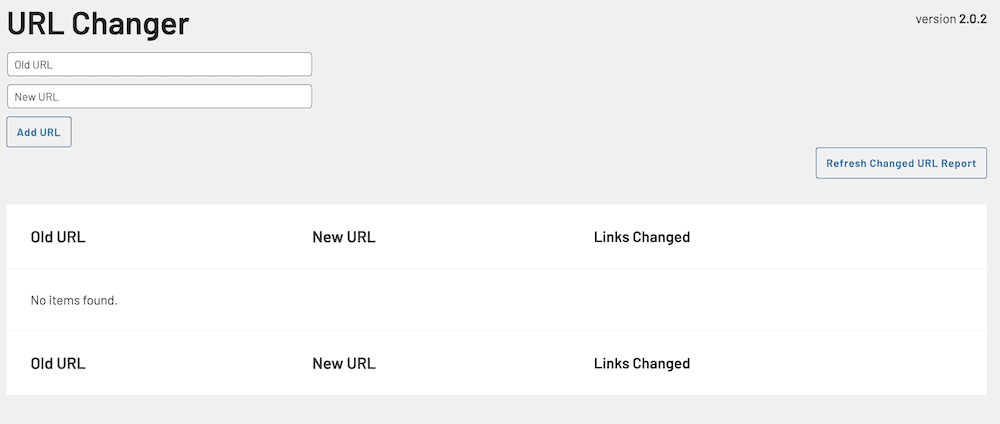
The URL changer is essentially a redirect.
However, it only works within your site. You’ll need another redirect creator to change the URL if others have linked to it (Rank Math does this).
Put in the old URL and then the new URL that you want it redirected to – even if it’s off your site.
I like that it lets you track the instances of links changed on your website, as it fully replaces them with a new link so you don’t have 301 redirects within your site all over.
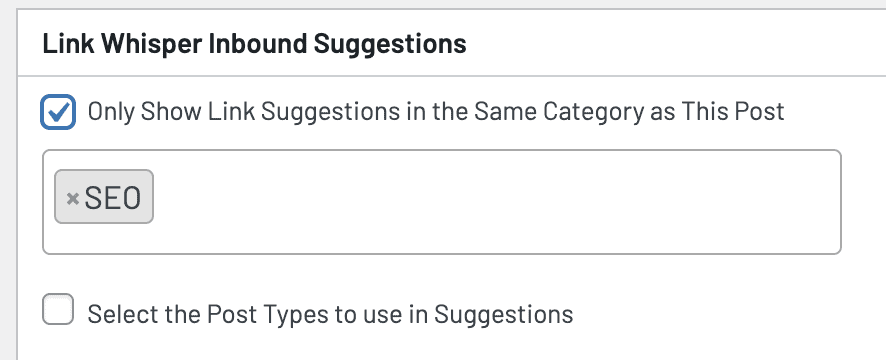
Sort By Category
I love this feature to ensure that you can maintain an intentional internal linking strategy for your blog.
When adding inbound or outbound links, you can select which categories to relevantly link to.
If your site has many niches, like travel and makeup. It makes sense to not link between these sections of your blog.
For travel blogs, this can save you a lot of time filtering out “restaurants” from like 8 other countries when the post is about Canadian restaurants.
You can add more than 1 category, which is great for customization.
Ignore URLs
You can select to ignore a post suggestion that is given if you don’t feel it’s relevant. Then it will not show up again for that specific post.
Identify Orphaned Posts
Orphaned posts are posts with no internal links within your site.
You’d be surprised at how many you can have by accident.
A post with no internal links is seen as weak by Google, as you’re not passing any authority to it or driving traffic. These pages should either be no-indexed (like if they are your “social page” for Instagram and aren’t relevant to your site) or they desperately need some internal links.
You should prioritize adding links to these posts, or writing posts that have relevant link opportunities, to ensure they aren’t dragging down your site.
Tie in Sister Sites
As someone with 3+ sites now, I love this feature.
Link Whisper lets you link across your sites.
If your sites are on the same license, you can connect them as sister sites to pass link juice between them.
For example, I can link to my blog on Ottawa from my Nina Out and About general travel blog.
And it’ll be classified as an internal link in the database so I can be sure I add enough actual external links as well.
Edit Anchor Text
If you don’t like the suggested anchor text, you can edit it.
The first way to do this is to adjust the selection of what is already there.
Click on different words to add or remove their highlight. This will alter the anchor text.
Or click “edit” and adjust the sentence as you like. Link Whisper will apply this to the post automatically.
🤩 Get access to all these features and more with Link Whisper!
Link Whisper Pricing
Link Whisper starts at $77/year.
They do sales throughout the year where the price is as low as $55/year.
The price rises based on the number of sites you’ll have included, but the features are the same.

Link Whisper Alternatives
I have not found a single plugin that does EXACTLY what Link Whisper does.
Internal Link Juice allows you to link between posts and pages on your site. But unless you upgrade to pro, you need to do it manually. It doesn’t pull from GSC or Rank Math to suggest anchor text.
Internal Links Manager is a much more manual plugin. You have to add keywords manually, set individual link parameters, and enter the URLs yourself.
Other options are competitors who manually do link building for small businesses and charge per hour or per month, with prices starting at $100 per hour.
These include:
- Link Lifting
- Victorious
- Deluxe
- SEO Brand
- Websites Deposit Inc
- W3 Affinity
- Kwork
Link Whisper costs $77 PER YEAR for as many links as you want. And you have complete control of them yourself!
Plus, the most sites you add, the cheaper it is.
Pros and Cons of Link Whisper
🤩 Get the benefits of all these pros today!
Verdict: Is It Worth It?
If you’re working on your SEO and want to take things to the next level, Link Whisper is worth it.
You will save hours of time with its automatic internal linking suggestions.
And if you have multiple sites, Link Whisper can help increase traffic between them as well.
The only downside is that it’s a yearly subscription. But it’s worth it for the time you’ll save!
Link Whisper is a great tool that can help improve your SEO. It’s affordable and easy to use, and it can save you a lot of time. I highly recommend it!
? Editor’s Pick: Link Whisper Plugin
FAQs
If I uninstall the plug in, will my links be deleted?
Nope! Link Whisper adds the links as HTML code so they will stay on your site even if you delete the plugin or cancel your subscription.
Is there a money-back guarantee?
Yes, Link Whisper offers a 30-day money-back guarantee. But honestly, you won’t need it.
What languages are supported by Link Whisper?
Link Whisper supports many languages, like English, Spanish, Hindi, Polish, and more! You can read all of the other languages here.
What is the best WordPress plugin for creating internal links?
Link Whisper is the best and most affordable WordPress plugin for creating internal links. At $77 a year it has more functionality than any competitor and will improve your SEO strategy.
LinkWhisper paid vs. free plugin: which do I need?
Purchase the paid plugin. The free version does not have significant functionality or the benefit of artificial intelligence for internal link building.
Is it possible to use Link Whisper with a page builder?
Yes! You can use LinkWhisper with most page builders. Link Whisper works with the classic Editor, Gutenburg Blocks, Beaver Builder, Kadence Blocks, Divi, Elementor, and more.
How relevant are link suggestions?
The link suggestions that Link Whisper provides are as relevant as the information you can give it.
So if you haven’t set any keywords and your posts don’t rank for any on Google Search Console, they won’t be relevant.
But if you have keywords that you target listed in your Rank Math plugin, have some Google Search Console data to pull, have relevant categories, and write on the same topic regularly, then the suggestions will be incredibly relevant.
I find 80% of the suggestions are relevant for my sites.
Can I remove Links Made by Link Whisper? How?
Yes. You can remove the links by unlinking them manually on the post or page, as you would with any manually added link.
🤩 Get Link Whisper today to supercharge your internal linking
See More Amazing Blogging Tools And My Honest Reviews
- Ezoic Review: Will it Increase Your Blog Revenue?
- Travelpayouts Review: 6 Figure Travel Blogger Weighs In
- Honest RankIQ Review: Is It Worth It for SEO?
- Try Interact Quiz Review: How I Grow My Email List By 1300+ Monthly!
- Lyrical Host Review: The #1 Host for Bloggers
- Travel Blogging Summit Denver 2022 Review & Key Takeaways
- My Honest Jasper.ai Review: The Best AI for SEO Blog Posts
- 19 Best Surfer SEO Alternatives for Bloggers
- 23 Best Ahrefs Alternatives For Bloggers (Free & Paid)
- 12 Best Ubersuggest Alternatives for Keyword Research
- Essential WordPress SEO Plugins for Bloggers
