
She Knows SEO contains affiliate links and is a member of the Amazon Services LLC Associates Program. If you make a purchase using one of these Amazon links, we may receive compensation at no extra cost to you. See our Disclosure Policy for more information.
SEO for Travel Bloggers: 19 Easy to Implement Tips to Scale to Full-Time Income

SEO is the most important thing for travel bloggers to focus on if they want to make a full-time income blogging.
This is because by optimizing their website and content for search engines, they can increase traffic to their blog which will result in more revenue.
In this article, I will discuss 19 SEO tips that travel bloggers can use to improve their ranking in search engines and scale to full-time income.
I’ve been a travel blogger for 5 years.
I tried all of the Pinterest, social media, and Quora strategies to grow my traffic and make a full-time income.
But none of them worked.
It wasn’t until I developed my proven SEO framework that I scaled my blog to Mediavine in 6 months and started making 5 figures PER MONTH!
I’m going to share some secrets of SEO that I used to get there…

Profitable Part-Time Blogger
Ready to grow a blogging business that fits your life?
The Profitable Part-Time Blogger Program helps you attract your ideal audience, master SEO, and make $5K/month—all in just 20 hours a week.
Whether it’s a side hustle or your dream job, it’s time to work smarter, not harder. Let’s make your blog work for you!

What is SEO?
SEO stands for “Search Engine Optimization”.
SEO is the process of optimizing your website and content for Google search with the goal of ranking higher in the search results.
It’s sort of like translating your site to Google’s dialect of English so it knows what you’re talking about.
The higher you rank in the search results, the more traffic you will get to your website.
And if you can get more traffic to your website, you can make more money from advertising or other forms of monetization.
Why do you need SEO?
When you’re planning a trip, what’s the first thing you do?
For most people, it’s going onto Google and typing in their destination to find things to do, the best places to stay, where to eat, and more!
Those links that you’re clicking on Google are often from bloggers who are making an income from your time on their site and getting clicks on their affiliate links.
Some people say SEO is dead, but as long as Google continues to be the #1 stop for users to gather information and make purchasing decisions, as it still is in 2022, SEO should be your first priority.
SEO is the most important thing for travel bloggers because it will help you get more traffic from Google, and if you can get more traffic from Google, you can make more money.

How can SEO scale your travel blog?
The amount of traffic that you get from SEO will depend on how much effort you put into it and how well you rank for your target keywords.
If you’re just starting out, you might only get a few hundred visitors from Google each month.
But if you’re able to scale your SEO efforts, you could easily get tens of thousands of visitors from Google each month.
And if you can get tens of thousands of visitors to your website each month, you can make a full-time income from your travel blog!
Ad income is directly related to how many people visit your site and how long they stay on each page.
Additionally, the more posts you have ranking, the more opportunity to guide people to your affiliate links or products!
Did you know that over 90% of successful travel bloggers say they use SEO to grow?
Basic SEO for travel bloggers: 19 SEO tips
1. Travel Blog Keyword 101
The first step in SEO is to understand how keywords work and how to use them effectively.
A keyword is a word or phrase that someone types into Google when they’re looking for something.
For example, if someone is planning a trip to Japan, they might search for “Japan travel guide” or “things to do in Japan”.
As a travel blogger, your goal is to rank for keywords that are related to your destination so that you can give people the information they’re looking for and make money from your blog!
So how do you do this?
Keyword Research
The first step is to do some keyword research to find out what keywords people are searching for when they’re planning a trip to your destination.
There are a few different ways to do this:
– Use Google’s Keyword Planner tool: This is a free tool that you can use to see how many people are searching for certain keywords.
– Look at Google’s suggested keywords: When you start typing a keyword into Google, it will suggest similar keywords that people are searching for.
– Look at your competitors’ keywords: Use a tool like Ahrefs or Keysearch to see what keywords your competitors are ranking for.
This will give you an idea of what keywords you should be targeting.
BUT finding random keywords isn’t enough.
Just because someone is searching for it, doesn’t mean you can rank for it.
👉 Get Keysearch – my favourite keyword research tool – for 30% off with code “sheknowsseo”!
Not All Keywords Are Made Equal
There are three types of keywords that you’ll come across during your research:
1. Short-tail keywords: These are 1-2 word phrases that are very general and have a lot of searches, like “travel” or “Japan”.
They’re usually too competitive to rank for if you’re just starting out.
2. Long-tail keywords: These are 3+ word phrases that are more specific, like “Japan travel guide” or “things to do in Japan”.
They usually have fewer searches than short-tail keywords, but they’re also much easier to rank for.
3. LSI keywords: These are related keywords that you can use throughout your content to signal to Google what your post is about, without using the exact keyword.
For example, if you’re trying to rank for the keyword “Japan travel guide”, some LSI keywords might be “places to visit in Japan” or “best time to visit Japan”.
Now that you know the difference between these three types of keywords, it’s time to start incorporating them into your content!
Keyword Volume
You’ll also need to check the search volume of relevant keywords.
Is it worth it to spend a long time writing a post that only 10 people search for?
New travel bloggers will need to target these search terms, but as you grow you can target better keywords to bring in your target audience.
How to Use Keywords in Your Content
Once you’ve done your research and found some good keywords to target, it’s time to start using them in your content!
Here are a few things to keep in mind when you’re using keywords:
– Use keyword-rich titles: Your title should be reflective of the content of your post and should include your target keyword.
– Use keywords throughout your content: In addition to using your target keyword in your title, make sure to use it (and related keywords) throughout your post.
– Use one main keyword per post: Best practices for on-page SEO involve using one main keyword for each post, then optimizing for extra keywords as secondary or tertiary.
– Avoid keyword stuffing: It’s important to use keywords throughout your content, but don’t go overboard with it. Google will penalize you if you stuff too many keywords into your content.
– Use LSI keywords: As I mentioned before, LSI keywords are related keywords that you can use to signal to Google what your post is about. Make sure they match user intent and are important to the post!
– Use keywords in your meta descriptions: In addition to using keywords in your title and content, you should also use them in your meta descriptions. Meta descriptions are the short descriptions that appear under your title in Google search results.
– Use keywords in your URL: Your URL should be reflective of the title of your post and should include your target keyword.
By following these tips, you’ll be well on your way to ranking for your target keywords and driving traffic (and income!) to your travel blog!
P.S. If you’re looking for help with your SEO, I offer SEO consulting services for travel bloggers! Feel free to message me for more customized support to grow your travel blog to a full-time income.
2. Invest in a keyword research tool
If you’re serious about ranking in Google, then you’ll need to invest in a good keyword research tool.
I recommend using Keysearch. This tool is affordable and will help you find the right keywords to target.
Why can’t you use a free tool?
To be honest, they just don’t have the same power.
I tried free SEO tools for 4 months before investing in Keysearch and I saw a massive uptick in traffic immediately.
Using the same keyword research methods, a paid tool offered me WAY more value.
Not only do paid tools allow you to do a competitor analysis and track more metrics for keywords, BUT they also have better reporting.
So a free tool may say a keyword is easy, but it’s pulling the wrong data or out-of-date info. It may even overstate how many monthly searches there are for a keyword.
With a paid tool like Keysearch, you’re able to get relevant information to help you determine which keywords are worth pursuing so you can actually rank, and stop wasting time writing for keywords that are too competitive.
🤩 Use code “KSDISC” to get 20% off Keysearch today!

3. Tracking SEO with Google Analytics and Google Search Console
Google Analytics and Google Search Console are two essential tools for tracking your SEO progress.
Google Analytics will show you things like how much traffic your website is getting, where that traffic is coming from, and what pages on your site are being viewed the most.
This information is essential in understanding which SEO strategies are working and which ones need to be improved.
Google Search Console, on the other hand, will show you how your website is performing in Google search results.
You can use Search Console to see things like which keywords your website is ranking for, what position your website is in for those keywords, and how many clicks and impressions your website is getting.
This information is essential in understanding which keywords you should be targeting and how well your website is performing for those keywords.
You can get started with both tools for free.
How to Get Them
All you need to do is create a free Google account (this can be with your site’s own email or with a Gmail account).
To create a Google Analytics account, head to Google Analytics and follow these steps.
In Google Analytics, you’ll be able to see your daily users, monthly sessions, etc. to track your site’s progress and growth.
To install Google Search Console, you’ll link it via your same Google account following these steps.
Here you can see the terms people are searching for on Google that lead to your site.

4. Install an SEO Plug-In
I recommend installing the free Rank Math SEO plug-in.
I switched to this SEO plug-in from Yoast a few months ago and have been extremely happy with it.
It’s helped me optimize my posts for better search engine ranking and offers more features than Yoast, plus it’s free!
Some of the features I love about Rank Math:
– It allows you to optimize your posts for up to 5 keywords (whereas Yoast only allows 1)
– It offers more in-depth analysis of your post’s SEO
– It’s easier to use and understand
If you’re using WordPress for your travel blog, then I definitely recommend installing Rank Math.
It will help you ensure that your posts are optimized for better search engine ranking.
You don’t need to get 100/100 on every post, but it will help you ensure that you’ve optimized your post as best as possible by placing keywords in relevant areas of your post.
5. Optimizing your page speed
One of the most important ranking factors for Google is page speed.
This is how fast your website loads when someone visits it.
A slow website will not only frustrate your visitors but also hurt your search engine ranking.
Google wants to provide its users with the best possible experience, so it favors websites that load quickly.
There are a few things you can do to improve your page speed:
– Use a lightweight WordPress theme
– Optimize your images for the web
– Use a caching plugin
– Use a CDN
Check Your Page Speed
You can use Google’s PageSpeed Insights tool (free!) to see how fast your website is loading and get suggestions on how to improve it.
Just enter your URL and Google will analyze your website’s speed and give you specific suggestions on how to improve it.
Optimizing Your Site for Mobile
Another important ranking factor is whether or not your website is mobile-friendly.
With more and more people accessing the internet from their smartphones, it’s essential that your website is optimized for mobile.
Google favors websites that are mobile-friendly because they provide a better user experience.
There are a few things you can do to make sure your website is mobile-friendly:
– Use a responsive WordPress theme
– Use large font sizes
– Ensure your menu bar collapses properly
To help with your site speed and mobile optimization, I recommend using the free Kadence themes and switching from a slower host like Bluehost to a superior company like Lyrical Host (which includes caching in your subscription cost).
Switch to Lyrical for the fastest hosting and best customer support!
6. Securing your travel blog with an SSL certificate
An SSL certificate is a must for any website, but especially for travel blogs.
SSL stands for Secure Sockets Layer and it’s what allows your website to have a secure connection.
It’s the little green lock you see in your URL bar when you visit a website.
You can get an SSL certificate for free from your web hosting company or from your domain name provider.
For example, if you’re using Namecheap, you can add an SSL certificate to your account for free.
If you’re not using Namecheap, contact your web hosting company and they’ll be able to help you add an SSL certificate to your account.
This is also what converts your site from http to https.
It’s important to do this at the beginning of your blogging journey or you’ll need to redirect all of your travel blog links to https afterwards.
Google prefers secure sites, so an SSL is a must for SEO rankings.
Get a free SSL with your domain today!
7. Determine your niche
One of the most important things you can do for your travel blog is to determine your niche.
Your niche is the specific topic or angle that you’ll be writing about on your travel blog.
For example, a niche could be “adventure travel” and you write about outdoor adventures and cultural experiences.
Some other examples of travel blog niches are:
– Solo travel
– Luxury travel
– Family travel
– Budget travel
– Food and drink focused
– Destination (i.e. a Mexico travel blog)
Once you’ve determined your niche, it will be much easier to write targeted content that appeals to a specific audience.
And as you build up your blog, you’ll become known as an expert in your niche, which will help you attract more readers and followers.
You can be a general travel or lifestyle blogger, but it’s SO much harder to rank for and will take much longer to scale to a full-time income.
You can always start niched down and grow.
So perhaps you begin as a Mexico-only blog, but grow to include other places down the line once you have gained authority for that region.
8. E-E-A-T the competition
E-E-A-T stands for Experience, Expertise, Authoritativeness, Trustworthiness.
It’s a Google ranking factor that was first introduced in the Google Quality Raters Guidelines.
These guidelines are what Google uses to train its human quality raters (people who rate websites to help Google improve its search algorithms).
In short, Google wants to know if you’re an expert in your field and if people can trust the information on your website.
There are a few ways to show Google that you’re an expert and that people can trust you:
– Include author bios with each blog post
– Get featured in other publications (guest posting is great for this)
– Add an “About Me” page to your website
– Include testimonials from readers or other experts in your field
As travel bloggers, we have it easier than some niches.
YMYL niches (Your Money Your Life) require special certifications in medicine or finance.
For travellers, we only need to prove that we have experience travelling and can be trusted.
However, you still have to prove this to Google.
I’ve seen so many travel bloggers skip this important factor for SEO and then wonder why they don’t rank.
Google doesn’t know if you’re worth listening to, so you have to show it that you know what you’re talking about!
9. Write on the same topic to build authority
If you want to become an expert in your field, you need to write about the same topic over and over again.
This is called “topical authority” and it’s one of the main Google ranking factors.
The more you write on a certain topic, the more Google will see you as an expert in that topic and reward you with higher rankings.
You don’t have to write about the same exact thing every single time, but you should at least be writing about similar topics.
For example, if your travel niche is “solo travel”, you could write blog posts about:
– The best solo travel destinations
– How to make friends while travelling solo
– The best travel apps for solo travellers
– How to stay safe while travelling solo
– The pros and cons of solo travel
As long as you’re writing about similar topics, you’ll be able to build up your topic authority and rank higher on Google.
This can be a challenge for travel bloggers, as most of us write about different locations constantly.
That’s why I designed the Profitable Part-Time Blogger Course. It’s my signature framework to help you grow to Mediavine-level traffic on your blog with SEO.
I teach you the steps to develop topical authority without limiting yourself to writing about one country or one city.
Through the course, I show you how to scale from beginner SEO to being an advanced SEO master who can scale blogs to 6-figure incomes with ad and affiliate revenue!
👩💻 Join today!
10. Internal link to send Google on a road trip through your site
Internal linking is one of the most underrated (and important) SEO strategies.
Internal links are basically like a road map for Google, telling it where to go next on your website.
The more internal links you have pointing to a certain page, the higher that page will rank (the goal being the first page of Google).
This is because Google sees those links as a “vote” for that page, telling it that the page is important and should be ranked higher.
There are a few things to keep in mind when internal linking:
– Only link to pages that are relevant to the current post
– Use keyword-rich anchor text (the text you’re hyperlinking)
– Don’t go overboard with linking (a few per post is enough)
If you want to learn more about internal linking and how to do it properly, I highly recommend checking out my Profitable Part-Time Blogger Course
I have a whole section on how to internal link passively, so you aren’t hunting for opportunities within your own site for hours every time you post.
11. Cite your sources with backlinks
Whenever you use someone else’s data or ideas in your blog post, make sure to cite them!
This is called a “backlink” and it’s basically like giving credit to the person who came up with the idea in the first place. When you give a backlink to someone else, you do it as an external link from your site to theirs.
Not only is this good manners, but it’s also great for SEO.
When you backlink to someone, you’re telling Google that you trust their information and that it’s worth reading.
This helps to improve your relationship with Google and can lead to higher rankings.
Just make sure that you’re only linking to high-quality websites, as linking to low-quality websites can hurt your SEO.
You also want to avoid backlinking to posts that are targetting the same keyword as you are.
For example, if you’re writing a blog post about “solo travel tips”, you wouldn’t want to backlink to another blog post that’s also about “solo travel tips”.
This could tell Google that their post knows more than yours, which would prevent you from ranking for this keyword.
Instead, link to relevant authorities to help support claims in your posts.
12. Build backlinks to your posts
In addition to citing your sources, you also want to make sure that other people are linking to your posts.
This is called “building backlinks” and it’s one of the most important things you can do for your SEO. It’s also known as “link building“.
The more backlinks you have pointing to your website, the higher Google will rank you.
This is because Google sees backlinks as votes for your website. The more votes you have, the more popular your site must be!
There are a few ways to build backlinks:
– Reach out to other bloggers in your niche and ask them to link to your post
– Reply to PR requests for sources via HARO (free to sign up!)
– Write guest blogs and collab posts for sites in your niches
– List your website on directories and link back to your post
If you want to learn more about how to build backlinks, I recommend checking out my Dominate Your DA ebook.
I teach you how to triple your DA with backlinks – and how to score DA 60+ backlinks that will launch your posts to page 1 on Google.
13. Write meta descriptions for every page
A meta description is a short paragraph of text that appears under your title in the search results.
It’s your chance to sell Google (and potential readers) on why they should click through to your blog post.
The best meta descriptions are:
– Less than 160 characters
– Focused on a single keyword or phrase
– Engaging and interesting
– Free of Grammar and Spelling errors
You can edit your meta descriptions in the Rank Math SEO plugin for WordPress.
It’ll appear on the sidebar of every post, and even help you calculate the characters so you don’t write too much!
Note: Google doesn’t always pull our meta descriptions. Sometimes they opt to pull text from within our post. That’s ok, but we should still write the best metas we can to help Google understand what our post is about.

14. Permalinks matter!
A “permalink” is the URL of your blog post.
It’s what people will type into their browser to read your post, and it’s also what shows up in the search results.
For example, this blog post’s permalink is: sheknowsseo.co/seo-for-travel-bloggers
As you can see, it includes the title of the post and our website’s URL.
This is what we want – a short, keyword rich URL that tells Google (and readers) exactly what the post is about.
Some people like to include the date in their permalinks (like seo-for-travel-bloggers-january-2020), but I don’t recommend this.
It doesn’t look as pretty and it’s one more thing for Google to try and figure out. Just keep it simple!
Plus, you’re limiting yourself to a specific date.
What if that information gets out of date?
SEO is constantly changing so Google will prefer current, updated posts rather than a two-year-old blog post.
15. Optimize your images
Every image you upload to your website should be optimized for SEO.
This means:
– Adding an alt tag with a keyword-rich description
You can do this when you upload the image in WordPress.
Here’s what it looks like:
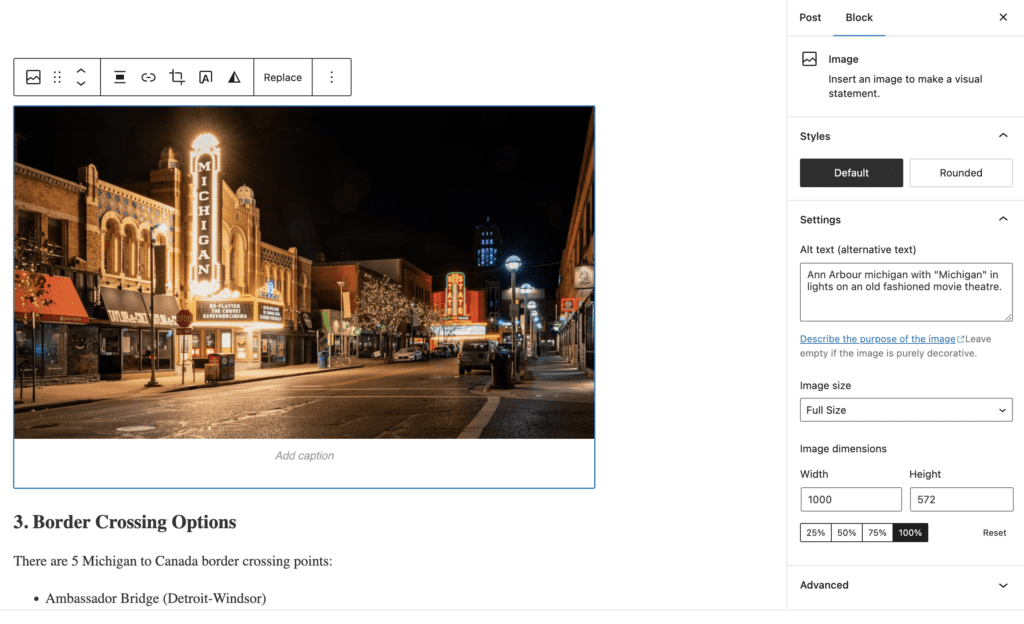
As you can see, I’ve added a keyword-rich title and alt tag to this image.
This tells Google what the image is, and also gives me a chance to rank for that keyword.
It’s a win-win!
Compress Images
As travel bloggers, we use a LOT of images in our posts.
And that can really slow down your site.
If you’re not already compressing your images, you should start using a plugin to do it for you.
I recommend ShortPixel, which is a cheap plugin that will compress your images without losing any quality.
You can install it by going to Plugins > Add New in your WordPress dashboard and searching for ShortPixel.
You’ll need to buy credits, as the monthly credits aren’t enough for a travel blogger publishing weekly with 5+ images per post.
16. Target featured snippets and suggested drop downs
Featured snippets are the little boxes that appear at the top of the search results, usually with an image.
They look like this:

As you can see, this featured snippet is for the keyword “SEO tips”.
It’s basically a summary of what someone will find if they click through to that blog post.
Getting your blog post featured in a featured snippet is AMAZING for traffic.
It essentially guarantees that you’ll get clicks from the search results, even if you’re not in the top spot.
Suggested “people also ask” drop downs are similar to featured snippets, but they appear below the first few results.
They typically answer LSI keywords, which is why it’s so important to target these keywords in your post.
Here’s an example:
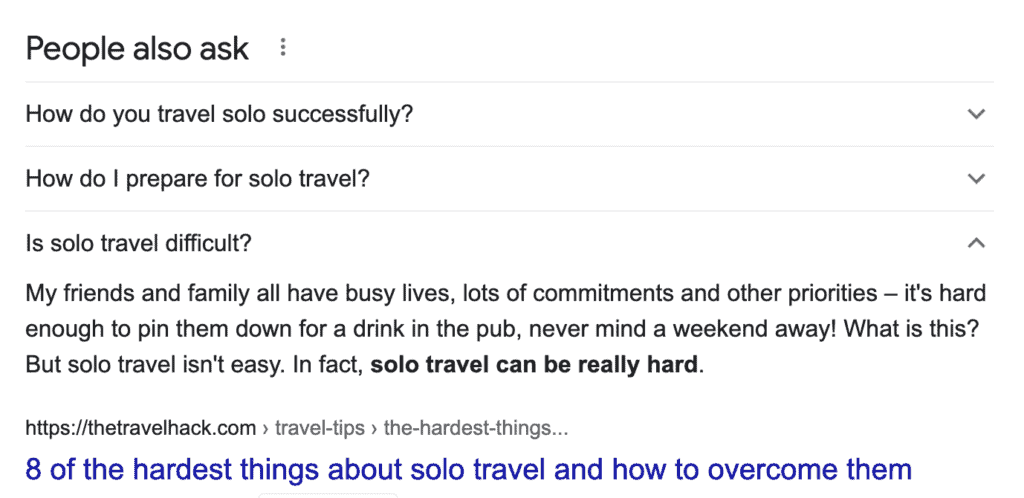
This suggested drop down is for the keyword “solo travel”.
It’s basically a list of solo travel questions that someone can click on to learn more.
17. Add videos
Videos are a great way to add more content to your blog post, and they’re also great for SEO.
Google loves videos, so if you can include one in your post it’s a great way to improve your chances of ranking.
Plus, videos are extremely engaging, so they’ll help keep people on your site longer which is also good for SEO (and ad income!).
If you don’t have a video of your own, you can always embed one from YouTube.
Just make sure it’s relevant to your post!
(Pssttt… did you notice the videos in this post?)
18. Grow your DA
Domain Authority (DA) is a metric created by Moz that measures how likely your website is to rank in the search results.
The higher your DA, the better your chances of ranking.
There are a few things you can do to improve your DA:
– Publish high-quality content
– Get links from high-DA websites
– Promote your content on social media
Need help growing your DA?
Check out my Dominate Your DA Ebook.
I teach you the exact strategies I’ve used to double my DA from 14 to 28 in 3 months AND that I repeated to triple my DA from 3 to 14 in just 2 months!
(All without buying backlinks or doing any black hat SEO methods.)
19. Avoid keyword cannibalization
Keyword cannibalization is when you have multiple blog posts on your website that are all ranking for the same keyword.
For example, let’s say you have two blog posts:
– “10 things to do in Paris”
– “5 things to do in Paris”
Both of these blog posts are targeting the same keyword “things to do in Paris”.
This isn’t ideal, because you’re essentially competing with yourself for that keyword.
Instead, you want to make sure that each of your blog posts is targeting a different keyword.
That way you have a better chance of ranking for both keywords.
There are a few ways to avoid keyword cannibalization:
– Use different keywords for each post
– Use long-tail keywords
– Target different stages of the buyer’s journey
You can check if two posts are targetting the same keyword in Google Search Console.
If they are, I recommend merging them into one post and redirecting them to a singular link.
Profitable Part-Time Blogger
Ready to grow a blogging business that fits your life?
The Profitable Part-Time Blogger Program helps you attract your ideal audience, master SEO, and make $5K/month—all in just 20 hours a week.
Whether it’s a side hustle or your dream job, it’s time to work smarter, not harder. Let’s make your blog work for you!
Use SEO to grow your travel blog to 6-figures!
As a travel blogger, you know that SEO is key to your success.
But what if you could take your SEO to the next level?
What if you could learn the exact strategies I’ve used to grow my traffic to Mediavine in just 6 months?
In my course, Profitable Part-Time Blogger, I teach you how to do just that!
You’ll learn how to:
– Optimize your blog posts for SEO
– Target high-value keywords you can rank for
– How often to use keywords in every blog post
– Grow your traffic with featured snippets
– Get more organic traffic from Google
– And much more!
Ready to take your traffic (and income) to the next level?
Want more free SEO tips? Join my SEO for bloggers Facebook group!
Read More About Travel Blogging!
- What is a Travel Blog: Definition & Examples from a 6-Figure Blogger
- 100+ Best Travel Blogs that Accept Guest Posts
- 60 Best Travel Affiliate Programs for Bloggers
- How to Make Money as a Travel Blogger: 15 Ways I Made $30k
- Travelpayouts Review: 6 Figure Travel Blogger Weighs In
- 19 Best Cameras for Travel Blogging & Vlogging
- Travel Blogging Summit Denver 2022 Review & Key Takeaways
- Basic SEO for Travel Bloggers: 19 SEO Tips to Scale to Full-Time Income
- Best Travel Blogging Courses: Which is Worth Your Money?
- 500+ Travel Blog Names: How to Choose a Unique & Memorable Name in Any Niche
- 69 Travel Blog Statistics You Need to Know
- 50+ Best Facebook Groups for Travel Bloggers to Engage and Grow
- 140+ Engaging Travel Blog Post Ideas for Every Niche
- How I Grew My Travel Blog by 45k Pageviews in 6 Weeks
- Niche Site Deep Dive: A DA 13 Travel Blog on Adthrive?
- Travel Blog Audit: Complete Tutorial To Improve Your Website
- This Travel Blogger Got Into Mediavine in 1 Year
- “How Is This Legal?” Travel Blogger Calls Out Google’s Knowledge Graph
- How This Travel Blog is Winning at SEO Post Helpful Content Update
